正文摘要:
《Windows 10 IoT 企業版 LTSC》核心主題 快速閱讀精華
🔥 版本特色:
這是一個官方精簡的長期服務版,系統乾淨且支援年限長。特別整合了「去除 Windows Defender」的版本,讓系統更輕量。內建超實用工具包,安裝過程按快捷鍵就能叫出磁碟管理、備份等工具。
🚀 安裝亮點:
提供「無人值守安裝」功能,放入USB就能自動裝到好,超省事!如果不想要自動安裝,刪除一個檔案就能切換回手動自訂安裝模式。
🔑 檔案資訊:
檔案大小約 5.61 GB,格式為 ISO,存放於 Google 雲端硬碟。
.article-toc { border: 1px solid #ddd; padding: 15px; background: #f9f9f9; border-radius: 6px; margin: 20px 0; width: 90%;}.article-toc br { display: none;}.toc-title { /* --- 以下是合併進來的 H2 樣式 --- */ font-size: 1.25em; /* 125% */ border-left: 5px solid #2A98DA; border-radius: 2px; padding: 5px 0px 5px 10px; font-weight: bold; margin: 0 0 15px 0; /* 調整了 margin,只留下方 15px */ color: #333; line-height: 1.5; background-color: #f8f8f8; /* --- 樣式合併結束 --- */}.toc-list { list-style: none; padding-left: 0;}.toc-list li { margin: 8px 0;}.toc-list a { color: #2A98DA; text-decoration: none;}.toc-list a:hover { text-decoration: underline;}.back-to-top { display: block; margin-top: 10px; font-size: 0.9em; color: #666;}本文章目錄
規格化資訊document.currentScript.previousElementSibling.href = location.href.split('#')[0] + '#info';
軟體截圖document.currentScript.previousElementSibling.href = location.href.split('#')[0] + '#screenshot';
無人職守安裝說明document.currentScript.previousElementSibling.href = location.href.split('#')[0] + '#install';
應用工具說明document.currentScript.previousElementSibling.href = location.href.split('#')[0] + '#tool';
檔案驗證碼document.currentScript.previousElementSibling.href = location.href.split('#')[0] + '#verify';
常見問題Q&Adocument.currentScript.previousElementSibling.href = location.href.split('#')[0] + '#faq';
附件下載 🔽document.currentScript.previousElementSibling.href = location.href.split('#')[0] + '#download';
【語 言】:繁體中文
【軟體名稱】:Windows 10 IoT 企業版 LTSC 2021 2合1 繁體中文版
【版本資訊】:v19045.6691 (22H2)
【軟體大小】:5.61 GB
【更新日期】:2025年12月10日
【使用權限】:作業系統(詳見微軟授權條款)
【系統支持】:x64 系統
【軟體介紹】:
這是一個專為追求穩定與長效支援使用者所準備的 Windows 10 作業系統整合版。它基於微軟官方釋出的 Windows 10 IoT 企業版 LTSC 2021 版本打造,這個版本本身沒有內建 Edge 瀏覽器、Microsoft Store 等現代應用,可謂官方的精簡版本,能提供長達10年的支援週期,非常適合需要長期穩定運行的環境。
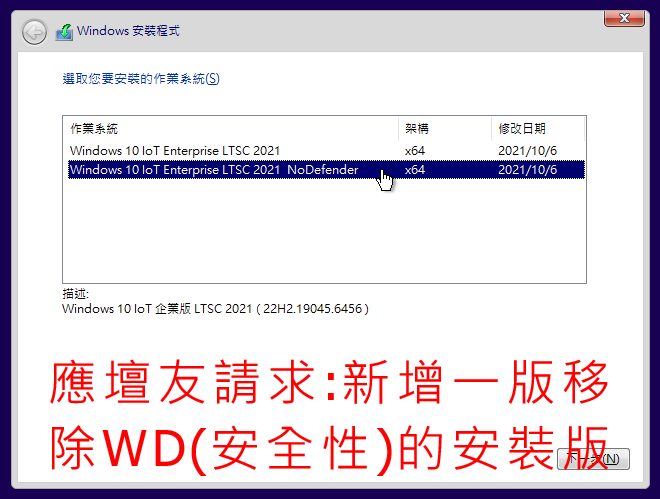
本次分享的「2合1版本」更整合了實用的修改,包含了標準版以及「去除 Windows Defender」的版本,讓使用者能根據自身對安全防護軟體的需求進行選擇。此外,作者還貼心整合了多款實用的系統安裝與維護工具,並設計了便捷的「無人值守安裝」模式,讓整個安裝過程更加自動化與省時。以下將詳細解說如何安裝與使用內建工具。
【軟體截圖】:
👉 GM後台版 遊戲 推薦 ⬇️⬇️⬇️ 快速玩各種二次元動漫手遊app
如果你希望自訂安裝過程,例如建立自己的本機帳戶、設定密碼,或改用微軟帳戶登入,方法也很簡單:在開始安裝前,使用任何檔案管理工具開啟 ISO 檔案,找到並刪除根目錄下的「Autounattend.xml」這個檔案,再進行安裝,系統就會回到傳統的手動設定安裝介面了。
應用工具說明
在系統安裝過程中的任何階段(例如在磁碟分割畫面時),你可以隨時按下鍵盤的「Shift + F10」組合鍵,呼叫出命令提示字元視窗。此時輸入特定的快捷指令,就能快速啟動對應的實用工具,對於系統維護、備份或分割磁碟非常有幫助。
以下是完整的快捷指令列表:
• 輸入「APP」後按 [Enter]:叫出整合的工具包選單。
• 輸入「AB」後按 [Enter]:啟動 Aomei Backupper (備份軟體)。
• 輸入「AP」後按 [Enter]:啟動 Aomei Partition Assistant (磁碟分割管理)。
• 輸入「DG」後按 [Enter]:啟動 DiskGenius (磁碟管理與資料救援)。
• 輸入「DM」後按 [Enter]:啟動 Dism++ (系統封裝與優化工具)。
• 輸入「ES」後按 [Enter]:啟動易數一鍵還原。
• 輸入「GT」後按 [Enter]:啟動 Symantec Ghost (經典備份還原工具)。
• 輸入「PW」後按 [Enter]:啟動 Windows Login Unlocker (解除登入鎖定)。
• 輸入「SG」後按 [Enter]:啟動 SGI 備份還原工具。
• 輸入「WS」後按 [Enter]:啟動 WinNTSetup (系統安裝輔助工具)。
檔案驗證碼
下載完成後,建議使用校驗工具比對以下雜湊值,確保檔案完整無損:
MD5: 2449bf27bee61c0a37c083f4cf7bcaec
SHA1: 85cf8d769ff5d065d50c054c5aea3e36ea3c6569
常見問題Q&A
Q:這個版本需要產品金鑰啟用嗎?
A:是的,這是一個完整的 Windows 作業系統安裝映像檔。安裝完成後,你需要擁有合法的 Windows 10 IoT 企業版 LTSC 授權金鑰來啟用系統。
Q:「2合1版本」是什麼意思?我該如何選擇?
A:它整合了兩個版本於單一ISO中:一個是標準的 IoT 企業版 LTSC,另一個是移除了 Windows Defender 的版本。在安裝過程中,系統會提供選單讓你選擇要安裝哪一個版本。
Q:什麼是「無人職守安裝」?如果我不想用自動安裝怎麼辦?
A:無人職守安裝意味著系統會使用預先寫好的設定檔自動完成安裝步驟。若你想手動設定使用者帳戶等選項,只需在安裝前刪除ISO根目錄的「Autounattend.xml」檔案即可關閉此功能。
以下廣告滑動後還有帖子內容var custom_call_MIR = function (params) {if ( params === null || params.hasAd === false ) {var divRowSide;for (let index = 0; index < ONEADs.length; index++) {if (ONEADs[index].pub.player_mode === "mobile-inread") {divRowSide = ONEADs[index].pub.slotobj;}}var ins = document.createElement('ins');ins.className = 'clickforceads';ins.setAttribute('style', 'display:inline-block;');ins.setAttribute('data-ad-zone', '18264');divRowSide.appendChild(ins);var js = document.createElement('script');js.async = true;js.type = 'text/javascript';js.setAttribute('src', '//cdn.holmesmind.com/js/init.js');js.onload = function(){console.log('[ONEAD MIR] ClickForce Loaded');};divRowSide.appendChild(js);}};var _ONEAD = {};_ONEAD.pub = {};_ONEAD.pub.slotobj = document.getElementById("oneadMIRDFPTag");_ONEAD.pub.slots = ["div-onead-ad"];_ONEAD.pub.uid = "1000509";_ONEAD.pub.external_url = "https://onead.onevision.com.tw/";_ONEAD.pub.scopes = ["spotbuy", "speed"];_ONEAD.pub.player_mode_div = "div-onead-ad";_ONEAD.pub.player_mode = "mobile-inread";_ONEAD.pub.queryAdCallback = custom_call_MIR;var ONEAD_pubs = ONEAD_pubs || [];ONEAD_pubs.push(_ONEAD);var truvidScript = document.createElement('script'); truvidScript.async = true; truvidScript.setAttribute('data-cfasync','false'); truvidScript.type = 'text/javascript'; truvidScript.src = '//stg.truvidplayer.com/index.php?sub_user_id=597&widget_id=3309&playlist_id=2381&m=a&cb=' + (Math.random() * 10000000000000000); var currentScript = document.currentScript || document.scripts[document.scripts.length - 1]; currentScript.parentNode.insertBefore(truvidScript, currentScript.nextSibling);
【附件下載】:
[251210] Windows.10_loT.Enterprise.LTSC.2021.x64_zh-TW.ISO



 組圖開啟中,請稍候......
 收藏
收藏
