正文摘要:
《Garry's Mod》Nexus External ESP V2 快速閱讀精華
🔧 工具核心: 一款基於 Python 的外部輔助工具,主打 ESP (透視) 功能,相對安全。🎯 主要功能:
視覺輔助: 玩家透視 (ESP)、骨架、血量、名稱、距離顯示。自動功能: 自動開槍 (Triggerbot)、自動連跳 (Bhop)。實用工具: 動態準心、被觀戰提示。
💻 安裝需求:
環境: 64 位元的 Gmod (Gmod x64)。語言: 安裝 Python。模組: dearpygui, pywin32, PyMeow。
⚠️ 重要提醒: 工具內建的「寫入記憶體」功能 (如 Bhop) 可能被某些反作弊系統偵測,使用前請詳閱內文說明並自行評估風險。
.article-toc { border: 1px solid #ddd; padding: 15px; background: #f9f9f9; border-radius: 6px; margin: 20px 0; width: 90%;}.article-toc br { display: none;}.toc-title { /* --- 以下是合併進來的 H2 樣式 --- */ font-size: 1.25em; /* 125% */ border-left: 5px solid #2A98DA; border-radius: 2px; padding: 5px 0px 5px 10px; font-weight: bold; margin: 0 0 15px 0; /* 調整了 margin,只留下方 15px */ color: #333; line-height: 1.5; background-color: #f8f8f8; /* --- 樣式合併結束 --- */}.toc-list { list-style: none; padding-left: 0;}.toc-list li { margin: 8px 0;}.toc-list a { color: #2A98DA; text-decoration: none;}.toc-list a:hover { text-decoration: underline;}.back-to-top { display: block; margin-top: 10px; font-size: 0.9em; color: #666;}本文章目錄Nexus ESP V2 功能一覽document.currentScript.previousElementSibling.href = location.href.split('#')[0] + '#features';
重要提醒:使用前必讀document.currentScript.previousElementSibling.href = location.href.split('#')[0] + '#risk_warning';
安裝教學:一步一步帶你飛document.currentScript.previousElementSibling.href = location.href.split('#')[0] + '#install_guide';
- 遇到黑畫面怎麼辦?document.currentScript.previousElementSibling.href = location.href.split('#')[0] + '#install_guide_blackscreen';
如何啟動與使用document.currentScript.previousElementSibling.href = location.href.split('#')[0] + '#usage_guide';
功能實機展示document.currentScript.previousElementSibling.href = location.href.split('#')[0] + '#screenshots';
腳本原始碼 🔽document.currentScript.previousElementSibling.href = location.href.split('#')[0] + '#source_code';
常見問題Q&Adocument.currentScript.previousElementSibling.href = location.href.split('#')[0] + '#faq';
想在 Gmod 的世界裡當個先知,洞察敵人的一舉一動嗎?或是覺得自己的反應跟不上戰況,需要一點點小小的幫助?別擔心,這篇教學要跟大家分享的「Nexus External ESP V2」,就是一款專為 Gmod x64 版本設計的強大輔助工具。
這款工具是「外部」的,意思就是它像一個獨立的程式在旁邊輔助你,而不是直接修改遊戲主程式,理論上更難被偵測。從基本的玩家透視到自動開槍,功能應有盡有。接下來,我們會從安裝環境到啟動使用,手把手帶你完成所有設定!
Nexus ESP V2 功能一覽
這款工具的功能相當全面,底下我們整理了幾個最核心的亮點:
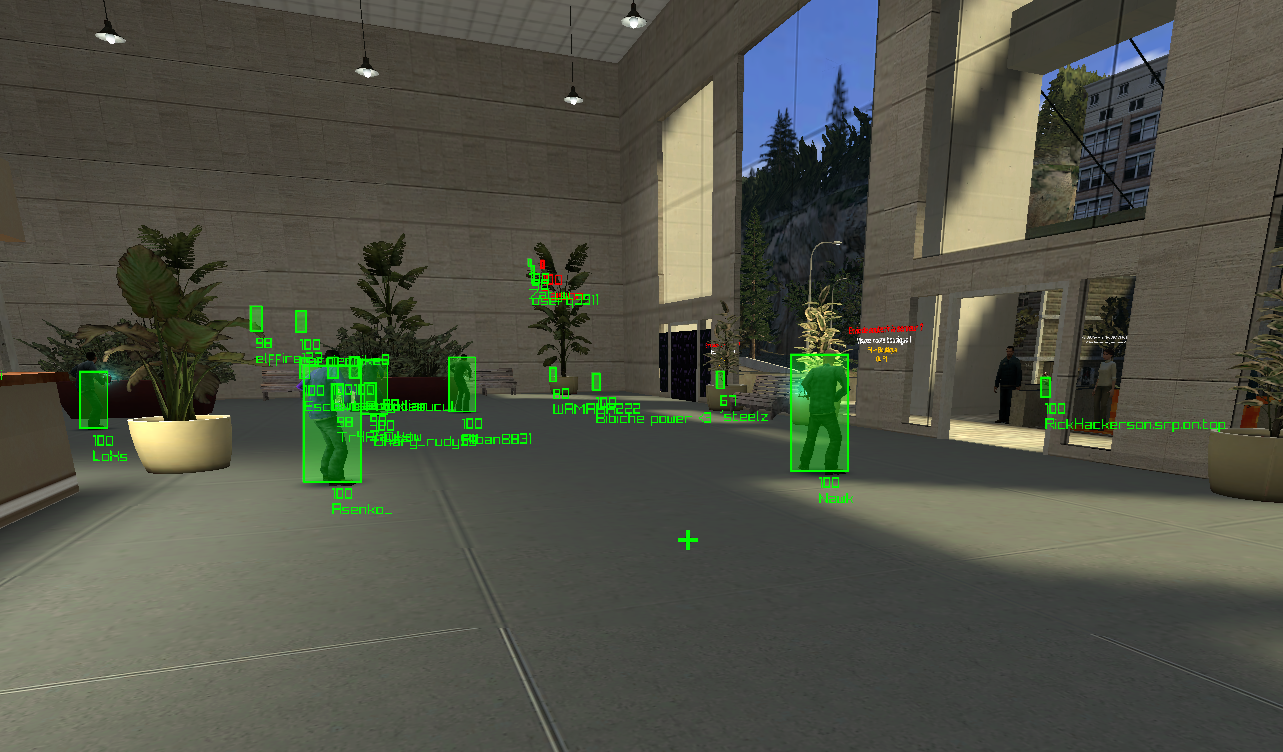
全方位 ESP (透視): 這是它的招牌功能!你可以自由設定顯示方框、骨架、血量、玩家名稱、武器、距離等資訊。還能根據敵人是否可見、是否在穿牆 (Noclipping) 狀態來改變顏色,讓你對戰場資訊瞭若指掌。動態準心: 一個會變色的智慧準心。平時是綠色,當你瞄準到敵人時會變成紅色,如果開啟了自動板機,顏色還會變成藍色,讓你清楚知道攻擊目標。被觀戰提示: 有人在偷偷看你第一人稱視角嗎?這個功能會在畫面上方跳出提示,讓你不再當冤大頭。自動連跳 (Bhop): 兔子跳的神器,讓你能在地圖上高速移動。自動板機 (Triggerbot): 只要準心瞄到敵人就會自動幫你開火,而且還能設定是要「按住」連射還是「單點」連發,反應力瞬間點滿!
重要提醒:使用前必讀
🚨 風險聲明 🚨
雖然這是一款外部工具,但並非所有功能都是 100% 安全的。
單純讀取遊戲記憶體的功能(例如 ESP 透視、準心)在 Gmod 這類遊戲中,被偵測的風險極低。但是,像是 Bhop (連跳) 或 Triggerbot (自動開槍) 這類需要「寫入記憶體」來模擬操作的高風險功能,就可能被比較厲害的反作弊系統發現。工具介面中已將這些高風險功能預設關閉,需要你手動勾選同意條款後才能啟用。請務必了解其中風險,並自行承擔後果。
安裝教學:一步一步帶你飛
別被看起來複雜的步驟嚇到,只要照著下面的流程,很快就能搞定。這就像是幫你的電腦準備好執行這個工具需要的「語言環境」和「零件」一樣。
安裝 Python:
首先,你的電腦需要 Python 這個程式語言環境。直接到 Python 官網下載並安裝即可。記得在安裝時,勾選「Add Python to PATH」這個選項,會方便很多。
安裝必要的 Pip 模組:
安裝好 Python 後,我們要來裝幾個必要的「工具包」。
打開你電腦的「命令提示字元 (CMD)」或「Windows Terminal」,然後輸入並執行以下指令:
pip install dearpygui, pywin32
【小知識】`pip` 是 Python 的套件管理工具,你可以把它想像成 Python 的 App Store,這個指令就是告訴電腦去下載 `dearpygui` 和 `pywin32` 這兩個工具包。
下載並安裝 PyMeow 模組:
這是最關鍵的核心模組。
前往 PyMeow 的發布頁面(這是一個 unknowncheats 的論壇帖子,裡面有 Github 連結)。在 Github 頁面中找到「Releases」區塊,下載最新版的 `.zip` 檔案(例如:`pyMeow-1.73.42.zip`)。將下載的 .zip 檔案解壓縮,然後在同一個資料夾內打開「命令提示字元」,輸入並執行以下指令來安裝(記得把檔名換成你下載的版本):
pip install pyMeow-1.73.42.zip
建立腳本檔案:
在你的電腦上找個喜歡的地方,新增兩個檔案,並將文章下方的原始碼完整複製貼上:
app.py (這是主程式)gui.py (這是圖形介面)
請確保這兩個檔案放在同一個資料夾底下。
遇到黑畫面怎麼辦?
如果你是 NVIDIA 或 AMD 的顯示卡用戶,啟動後若遊戲畫面變黑,可以嘗試以下設定:
NVIDIA 用戶: 前往 NVIDIA 控制面板,將「OpenGL GDI 相容性」選項設定為「偏好相容性」。AMD 用戶: 在 AMD 軟體中,啟用「OpenGL 三重緩衝」選項。
如何啟動與使用
安裝都搞定了嗎?那就可以準備進遊戲實戰囉!
啟動遊戲: 先打開你的 Garry's Mod (x64),然後隨便加入一個伺服器。執行腳本: 回到你存放 `app.py` 和 `gui.py` 的那個資料夾,在資料夾的路徑列輸入 `cmd` 並按下 Enter,快速打開命令提示字元。接著輸入以下指令來啟動工具:
py app.py
成功的話,你就會看到工具的設定介面跳出來,同時遊戲畫面中也會出現 ESP 特效了!
功能實機展示
口說無憑,直接來看看實際運作的畫面長什麼樣子吧!
腳本原始碼 🔽
app.py
```python
import pyMeow as pm
import dearpygui.dearpygui as dpg
from gui import *
import threading
import win32api
import json
import ctypes
class Offsets:
LocalPlayer = 0x9497f0
EntityList = 0x96b788
ViewMatrix = 0xac2568
ForceJump = 0xA388F0
Crosshair = 0x3700
BoneMatrix = 0x1A98
m_hObserverTarget = 0x2CC8
m_hActiveWeapon = 0x2940
Weaponname = 0x1D00
Playername = 0x3744
SteamID = 0x37C8
class Colors:
red = pm.get_color("#FF0000")
orange = pm.get_color("orange")
green = pm.get_color("#00FF00")
white = pm.get_color("white")
blue = pm.get_color("#0000FF")
light_blue = pm.get_color("#00FFFF")
hud = pm.get_color("#f5f5ff")
hud_fade = pm.fade_color(pm.get_color("black"), 0.6)
class Entity:
def __init__(self, addr, mem, gmod):
self.wts = None
self.addr = addr
self.mem = mem
self.gmod = gmod
self.health = pm.r_int(self.mem, self.addr + 0xC8)
self.team = pm.r_int(self.mem, self.addr + 0xD4)
self.dormant = pm.r_int(self.mem, self.addr + 0xB4)
self.noclipping = hex(pm.r_int(self.mem, self.addr + 0x84))
self.visiblity = hex(pm.r_int64(self.mem, self.addr + 0x88))
self.pos = pm.r_vec3(self.mem, self.addr + 0x308)
self.bone_base = pm.r_int64(self.mem, self.addr + Offsets.BoneMatrix)
try:
self.name = pm.r_string(self.mem, self.addr + Offsets.Playername)
self.steamid = pm.r_string(self.mem, self.addr + Offsets.SteamID)
self.get_spectated_player = pm.r_uint(self.mem, self.addr + Offsets.m_hObserverTarget) & 0xFFF
self.active_weapon = pm.r_uint(self.mem, self.addr + Offsets.m_hActiveWeapon) & 0xFFF
except:
pass
def bone_pos(self, bone_id):
return pm.vec3(
pm.r_float(self.mem, self.bone_base + bone_id * 0x30 + 0x0C),
pm.r_float(self.mem, self.bone_base + bone_id * 0x30 + 0x1C),
pm.r_float(self.mem, self.bone_base + bone_id * 0x30 + 0x2C),
)
class Local:
def __init__(self, addr, mem, gmod):
self.wts = None
self.addr = addr
self.mem = mem
self.gmod = gmod
self.pos = pm.r_vec3(self.mem, self.addr + 0x308)
def get_players():
gmod_exe = pm.open_process("gmod.exe")
client_dll = pm.get_module(gmod_exe, "client.dll")
players = []
for i in range(0, 128):
ent_addr = pm.r_int64(gmod_exe, client_dll["base"] + Offsets.EntityList + i * 0x20)
if ent_addr:
ent = Entity(ent_addr, gmod_exe, client_dll["base"])
try:
if ent.name and "STEAM_" in ent.steamid:
players.append((ent.name, ent.steamid))
except:
pass
return players
def start():
gui.init_menu()
threading.Thread(target=main, name='main', daemon=True).start()
dpg.start_dearpygui()
def main():
if not pm.process_exists("gmod.exe"):
ctypes.windll.user32.MessageBoxW(0, "Please make sure that gmod is open. And that you are using the Chromium x64 branch.", "Gmod x64 not found.", 48)
os._exit(0)
gmod_exe = pm.open_process("gmod.exe")
client_dll = pm.get_module(gmod_exe, "client.dll")
engine_dll = pm.get_module(gmod_exe, "engine.dll")
materialsystem_dll = pm.get_module(gmod_exe, "materialsystem.dll")
pm.overlay_init("Garry's Mod (x64)", fps=60)
holding = False
while pm.overlay_loop():
if not pm.process_running(gmod_exe):
os._exit(0)
pm.begin_drawing()
if dpg.get_value('c_hud'):
pm.draw_rectangle_rounded(5, 5, 248, 30, 0.2, 4, Colors.hud_fade)
pm.draw_rectangle_rounded_lines(5, 5, 248, 30, 0.2, 4, Colors.white, 2)
pm.draw_text(f"Nexus ESP | {pm.get_fps()} fps", 12, 11, 24, Colors.hud)
texts = []
if dpg.get_value('c_box'):
texts.append("ESP")
if dpg.get_value('c_tracer'):
texts.append("Tracer")
if dpg.get_value('c_crosshair'):
texts.append("Crosshair")
if dpg.get_value('c_bhop'):
texts.append("Bhop")
if dpg.get_value('c_triggerbot'):
if dpg.get_value('c_click_method') == "Hold":
texts.append("Triggerbot (Hold)")
else:
texts.append("Triggerbot (Tap)")
start_x = 5
start_y = 37
spacing = 27
for i, text in enumerate(texts):
y_offset = start_y + (i * spacing)
pm.draw_rectangle_rounded(start_x, y_offset, pm.measure_text(text, 20) + 14, 24, 0.2, 4, Colors.hud_fade)
pm.draw_rectangle_rounded_lines(start_x, y_offset, pm.measure_text(text, 20) + 14, 24, 0.2, 4, Colors.hud, 2)
pm.draw_text(text, start_x + 7, y_offset + 4, 20, Colors.hud)
try:
local_player_addr = pm.r_int64(gmod_exe, client_dll["base"] + Offsets.LocalPlayer)
except:
continue
if local_player_addr:
view_matrix_base = pm.r_int64(gmod_exe, engine_dll["base"] + Offsets.ViewMatrix) + 0x2D4
view_matrix = pm.r_floats(gmod_exe, view_matrix_base, 16)
notif_offset = 5
for i in range(0, 128):
ent_addr = pm.r_int64(gmod_exe, client_dll["base"] + Offsets.EntityList + i * 0x20)
if ent_addr == local_player_addr:
local_id = i
if ent_addr > 0 and ent_addr != local_player_addr:
ent = Entity(ent_addr, gmod_exe, client_dll["base"])
try:
if not dpg.get_value('c_onlyplayer') or "STEAM_" in ent.steamid:
if dpg.get_value('c_spectate'):
if ent.get_spectated_player == local_id:
if not isinstance(ent.name, bytes) and ent.name:
name = f" Spectated by: {ent.name} "
text_width = pm.measure_text(name, 24)
x = pm.get_screen_width() // 2 - text_width // 2
pm.draw_rectangle_rounded(x, notif_offset, text_width, 30, 0.2, 4, Colors.hud_fade)
pm.draw_rectangle_rounded_lines(x, notif_offset, text_width, 30, 0.2, 4, Colors.white, 2)
pm.draw_text(name, x, notif_offset + 6, 24, Colors.hud)
notif_offset += 35
if not dpg.get_value('c_hidedormant') or ent.dormant != -65536:
if ent.health > 0:
try:
with open("friends.json", "r", encoding="utf-8") as f:
friends = json.load(f)
except:
friends = []
if not dpg.get_value('c_onlyfriends') or ent.steamid in friends:
if dpg.get_value('c_maxdistance') != 0:
local = Local(local_player_addr, gmod_exe, client_dll["base"])
distance = pm.vec3_distance(local.pos, ent.pos)
if int(distance / 32) > dpg.get_value('c_maxdistance') and ent.steamid not in friends:
continue
if dpg.get_value('c_entcolor') == "Unicolor":
if ent.steamid in friends:
color = dpg.get_value('c_friends_colors')
r, g, b = map(int, color[:3])
hex_color = "#{:02X}{:02X}{:02X}".format(r, g, b)
ent.color = pm.get_color(hex_color)
else:
color = dpg.get_value('c_unicolor')
r, g, b = map(int, color[:3])
hex_color = "#{:02X}{:02X}{:02X}".format(r, g, b)
ent.color = pm.get_color(hex_color)
else:
if dpg.get_value('c_entcolor') == "Visibility":
if ent.visiblity != "0xffffffff":
ent.color = Colors.red
if dpg.get_value('c_hideinvisible'):
continue
else:
if ent.noclipping != "0xff00":
ent.color = Colors.orange
if dpg.get_value('c_hidenoclipping'):
continue
else:
if ent.steamid in friends:
color = dpg.get_value('c_friends_colors')
r, g, b = map(int, color[:3])
hex_color = "#{:02X}{:02X}{:02X}".format(r, g, b)
ent.color = pm.get_color(hex_color)
else:
ent.color = Colors.green
if dpg.get_value('c_showinvisible'):
if ent.visiblity == "0xffffffff":
continue
if dpg.get_value('c_shownoclipping'):
if ent.noclipping == "0xff00":
continue
elif dpg.get_value('c_entcolor') == "Team":
color = ((ent.team * 137) % 256 , (ent.team * 53) % 256, (ent.team * 197) % 256)
r, g, b = map(int, color[:3])
hex_color = "#{:02X}{:02X}{:02X}".format(r, g, b)
ent.color = pm.get_color(hex_color)
else:
health = max(0, min(ent.health, 100))
g = int(health * 2.55)
r = 255 - g
b = 0
ent.color = pm.get_color("#{:02X}{:02X}{:02X}".format(r, g, b))
if dpg.get_value('c_esp_method') == "BonesPos (experimental)":
try:
if pm.vec3_distance(ent.pos, ent.bone_pos(7)) < 100:
local = Local(local_player_addr, gmod_exe, client_dll["base"])
dist = pm.vec3_distance(local.pos, ent.pos)
ent.wts = pm.world_to_screen(view_matrix, ent.pos, 1)
head_pos = pm.world_to_screen(view_matrix, ent.bone_pos(7), 1)
head = ent.wts["y"] - head_pos["y"]
width = head / 2
center = width / 2
text_offset = 5
if dpg.get_value('c_box'):
pm.draw_rectangle(
posX=head_pos["x"] - center,
posY=head_pos["y"] - center / 2,
width=width,
height=head + center / 2,
color=pm.fade_color(ent.color, 0.3),
)
pm.draw_rectangle_lines(
posX=head_pos["x"] - center,
posY=head_pos["y"] - center / 2,
width=width,
height=head + center / 2,
color=ent.color,
lineThick=1.8,
)
if dpg.get_value('c_skeleton'):
bones = {
'neck': 5,
'shoulderRight': 9,
'shoulderLeft': 14,
'elbowRight': 10,
'elbowLeft': 15,
'handRight': 11,
'handLeft': 16,
'crotch': 0,
'kneeRight': 19,
'kneeLeft': 23,
'ankleRight': 21,
'ankleLeft': 25,
}
screen_positions = {}
for name, index in bones.items():
bone_pos = ent.bone_pos(index)
if pm.vec3_distance(ent.pos, bone_pos) < 100:
screen_positions[name] = pm.world_to_screen(view_matrix, bone_pos, 1)
connections = [
('neck', 'shoulderRight'),
('neck', 'shoulderLeft'),
('shoulderLeft', 'elbowLeft'),
('shoulderRight', 'elbowRight'),
('elbowRight', 'handRight'),
('elbowLeft', 'handLeft'),
('neck', 'crotch'),
('crotch', 'kneeRight'),
('crotch', 'kneeLeft'),
('kneeLeft', 'ankleLeft'),
('kneeRight', 'ankleRight'),
]
skeleton_color = ent.color
if dpg.get_value('c_box'):
skeleton_color = Colors.white
for a, b in connections:
if a in screen_positions and b in screen_positions:
p1, p2 = screen_positions[a], screen_positions
pm.draw_line(p1["x"], p1["y"], p2["x"], p2["y"], skeleton_color, 1)
else:
local = Local(local_player_addr, gmod_exe, client_dll["base"])
dist = pm.vec3_distance(local.pos, ent.pos)
width = 48000 / dist
center = width / -2
centerfix = center / 2
ent.wts = pm.world_to_screen(view_matrix, ent.pos, 1)
text_offset = 5
if dpg.get_value('c_box'):
pm.draw_rectangle(
posX=ent.wts["x"] + centerfix,
posY=ent.wts["y"] - width,
width=width / 2,
height=width,
color=pm.fade_color(ent.color, 0.3),
)
pm.draw_rectangle_lines(
posX=ent.wts["x"] + centerfix,
posY=ent.wts["y"] - width,
width=width/2,
height=width,
color=ent.color,
lineThick=1.8,
)
if dpg.get_value('c_tracer'):
pm.draw_line(
startPosX=pm.get_screen_width() // 2,
startPosY=pm.get_screen_height() // 2,
endPosX=ent.wts["x"],
endPosY=ent.wts["y"] - width,
color=ent.color,
thick=1.1,
)
if dpg.get_value('c_hp_text'):
pm.draw_text(
text=f"{ent.health}",
posX=ent.wts["x"],
posY=ent.wts["y"] + text_offset,
fontSize=15,
color=ent.color,
)
text_offset += 15
if dpg.get_value('c_name'):
if ent.name:
pm.draw_text(
text=ent.name,
posX=ent.wts["x"],
posY=ent.wts["y"] + text_offset,
fontSize=15,
color=ent.color,
)
text_offset += 15
if dpg.get_value('c_weapon'):
weapon_handle = pm.r_int64(gmod_exe, client_dll["base"] + Offsets.EntityList + (ent.active_weapon - 1) * 0x20)
weapon_name = pm.r_string(gmod_exe, weapon_handle + Offsets.Weaponname)
if not isinstance(weapon_name, bytes) and weapon_name:
pm.draw_text(
text=weapon_name,
posX=ent.wts["x"],
posY=ent.wts["y"] + text_offset,
fontSize=15,
color=ent.color,
)
text_offset += 15
if dpg.get_value('c_distance'):
pm.draw_text(
text=f"{int(dist/32)} m",
posX=ent.wts["x"],
posY=ent.wts["y"] + text_offset,
fontSize=15,
color=ent.color,
)
text_offset += 15
except Exception as err:
continue
else:
try:
local = Local(local_player_addr, gmod_exe, client_dll["base"])
dist = pm.vec3_distance(local.pos, ent.pos)
width = 48000 / dist
center = width / -2
centerfix = center / 2
ent.wts = pm.world_to_screen(view_matrix, ent.pos, 1)
text_offset = 5
if dpg.get_value('c_box'):
pm.draw_rectangle(
posX=ent.wts["x"] + centerfix,
posY=ent.wts["y"] - width,
width=width / 2,
height=width,
color=pm.fade_color(ent.color, 0.3),
)
pm.draw_rectangle_lines(
posX=ent.wts["x"] + centerfix,
posY=ent.wts["y"] - width,
width=width/2,
height=width,
color=ent.color,
lineThick=1.8,
)
if dpg.get_value('c_tracer'):
pm.draw_line(
startPosX=pm.get_screen_width() // 2,
startPosY=pm.get_screen_height() // 2,
endPosX=ent.wts["x"],
endPosY=ent.wts["y"] - width,
color=ent.color,
thick=1.1,
)
if dpg.get_value('c_hp_text'):
pm.draw_text(
text=f"{ent.health}",
posX=ent.wts["x"],
posY=ent.wts["y"] + text_offset,
fontSize=15,
color=ent.color,
)
text_offset += 15
if dpg.get_value('c_name'):
if ent.name:
pm.draw_text(
text=ent.name,
posX=ent.wts["x"],
posY=ent.wts["y"] + text_offset,
fontSize=15,
color=ent.color,
)
text_offset += 15
if dpg.get_value('c_weapon'):
weapon_handle = pm.r_int64(gmod_exe, client_dll["base"] + Offsets.EntityList + (ent.active_weapon - 1) * 0x20)
weapon_name = pm.r_string(gmod_exe, weapon_handle + Offsets.Weaponname)
if not isinstance(weapon_name, bytes) and weapon_name:
pm.draw_text(
text=weapon_name,
posX=ent.wts["x"],
posY=ent.wts["y"] + text_offset,
fontSize=15,
color=ent.color,
)
text_offset += 15
if dpg.get_value('c_distance'):
pm.draw_text(
text=f"{int(dist/32)} m",
posX=ent.wts["x"],
posY=ent.wts["y"] + text_offset,
fontSize=15,
color=ent.color,
)
text_offset += 15
except Exception as err:
continue
except Exception as err:
continue
if dpg.get_value('c_crosshair'):
try:
if dpg.get_value('c_triggerbot'):
target = pm.r_int(gmod_exe, local_player_addr + Offsets.Crosshair)
if target <= 128 and target != 0:
color = Colors.blue
if dpg.get_value('c_click_method') == "Hold":
if not holding:
pm.mouse_down(button="left")
holding = True
else:
pm.mouse_click(button="left")
else:
color = Colors.light_blue
if dpg.get_value('c_click_method') == "Hold":
if holding:
pm.mouse_up(button="left")
holding = False
else:
target = pm.r_int(gmod_exe, local_player_addr + Offsets.Crosshair)
if target <= 128 and target != 0:
color = Colors.red
else:
color = Colors.green
pm.draw_text(
text="+",
posX=pm.get_screen_width() // 2 - 10,
posY=pm.get_screen_height() // 2 - 18,
fontSize=40,
color=color,
)
except Exception as err:
continue
pm.end_drawing()
if dpg.get_value('blatantcheck'):
if dpg.get_value('c_bhop'):
if win32api.GetAsyncKeyState(0x20) == 0:
continue
noclipping = hex(pm.r_int(gmod_exe, local_player_addr + 0x84))
if noclipping == "0xff00":
flag = pm.r_int(gmod_exe, local_player_addr + 0x440)
if flag == 257 or flag == 263 or flag == 33025 or flag == 1280 or flag == 1281:
pm.w_int(gmod_exe, client_dll["base"] + Offsets.ForceJump, 5)
else:
pm.w_int(gmod_exe, client_dll["base"] + Offsets.ForceJump, 4)
if __name__ == "__main__":
gui = GUI()
start()
```
gui.py
```python
import dearpygui.dearpygui as dpg
import app
import json
import os
FRIENDS_FILE = "friends.json"
def enableblatant():
dpg.configure_item("c_triggerbot", enabled=True)
dpg.configure_item("c_click_method", enabled=True)
dpg.configure_item("c_bhop", enabled=True)
dpg.configure_item("blatantcheck", show=False)
def bone_mode():
if dpg.get_value('c_esp_method') == "BonesPos (experimental)":
dpg.configure_item("c_skeleton", enabled=True)
else:
dpg.configure_item("c_skeleton", enabled=False, default_value=False)
def load_friends():
if os.path.exists(FRIENDS_FILE):
with open(FRIENDS_FILE, "r") as f:
return json.load(f)
return []
def save_friends(friends):
with open(FRIENDS_FILE, "w") as f:
json.dump(friends, f, indent=4)
def toggle_friend(sender, app_data, user_data):
steam_id = user_data
friends = load_friends()
if steam_id in friends:
friends.remove(steam_id)
else:
friends.append(steam_id)
save_friends(friends)
get_playerlist()
def get_playerlist():
player_data = app.get_players()
friends = load_friends()
if dpg.does_item_exist("player_table"):
children = dpg.get_item_children("player_table", 1)
if children:
for child in children:
dpg.delete_item(child)
for player_name, steam_id in player_data:
with dpg.table_row(parent="player_table"):
dpg.add_text(player_name)
dpg.add_text(steam_id)
label = "Unfriend" if steam_id in friends else "Friend"
dpg.add_button(label=label, callback=toggle_friend, user_data=steam_id)
class GUI():
def init_menu(self) -> None:
dpg.create_context()
dpg.create_viewport(title="Nexus External ESP - V2", decorated=True, width=600, height=400)
with dpg.window(tag='w_main'):
with dpg.tab_bar():
with dpg.tab(label='Visuals'):
dpg.add_checkbox(label='Box ESP', tag='c_box', default_value=True)
with dpg.tooltip("c_box"):
dpg.add_text("Draws a box over players.")
dpg.add_checkbox(label='Skeleton ESP', tag='c_skeleton', enabled=False)
with dpg.tooltip("c_skeleton"):
dpg.add_text("Draws player skeletons.\nIf the server has a badly made model, it will show a messed up skeleton.")
dpg.add_checkbox(label='Tracer ESP', tag='c_tracer')
with dpg.tooltip("c_tracer"):
dpg.add_text("Draws tracer lines to players.")
dpg.add_checkbox(label='HP', tag='c_hp_text', default_value=True)
dpg.add_checkbox(label='Name', tag='c_name', default_value=True)
dpg.add_checkbox(label='Weapon', tag='c_weapon', default_value=True)
with dpg.tooltip("c_weapon"):
dpg.add_text("Draws the name of the held weapon.")
dpg.add_checkbox(label='Distance', tag='c_distance')
dpg.add_checkbox(label='Crosshair', tag='c_crosshair', default_value=True)
with dpg.tooltip("c_crosshair"):
dpg.add_text("Dynamic crosshair.\n\nWhen you look at a player the crosshair turns red.\nIf you activate the triggerbot:\nthe crosshair will be blue, if you look\nat a player it will be dark blue.")
dpg.add_text("")
dpg.add_checkbox(label='Hide Dormants', tag='c_hidedormant')
with dpg.tooltip("c_hidedormant"):
dpg.add_text("Hide Dormant Players on the ESP.\n\nPlayers become dormant when they leave\nthe Potential Visibility Set on the server.\nThis can also exclude fake players on the ESP.")
dpg.add_checkbox(label='Hide Invisible', tag='c_hideinvisible')
dpg.add_checkbox(label='Hide Noclipping', tag='c_hidenoclipping')
dpg.add_checkbox(label='Only Real Players', tag='c_onlyplayer', default_value=True)
with dpg.tooltip("c_onlyplayer"):
dpg.add_text("Show only entities with a SteamID.\n\nAllows you to hide entities that are\nnot real players.\nMust be unchecked if you want to do\ntesting with bots.")
dpg.add_checkbox(label='Only Friends', tag='c_onlyfriends')
dpg.add_checkbox(label='Only Invisible', tag='c_showinvisible')
dpg.add_checkbox(label='Only Noclipping', tag='c_shownoclipping')
with dpg.tab(label='Players'):
with dpg.group(horizontal=True):
dpg.add_button(label="Refresh", callback=get_playerlist)
dpg.add_color_edit(default_value=(0, 255, 255), tag='c_friends_colors', label="Friend Color",display_type=dpg.mvColorEdit_uint8, no_inputs=True, no_alpha=True)
with dpg.table(tag="player_table", header_row=True, borders_innerH=True, borders_outerH=True, borders_innerV=True, borders_outerV=True, resizable=True):
dpg.add_table_column(label="Name")
dpg.add_table_column(label="SteamID")
dpg.add_table_column(label="Action")
with dpg.tab(label='Blatant'):
with dpg.group(horizontal=True):
dpg.add_checkbox(label='Triggerbot', tag='c_triggerbot', enabled=False)
with dpg.tooltip("c_triggerbot"):
dpg.add_text("Clicks for you when you are hovering over a target.")
dpg.add_radio_button(tag="c_click_method", items=['Hold', 'Tap'], default_value="Hold", horizontal=True, enabled=False)
with dpg.tooltip("c_click_method"):
dpg.add_text("Should the triggerbot hold the click or spam click.")
dpg.add_checkbox(label='Bhop', tag='c_bhop', enabled=False)
dpg.add_text("")
dpg.add_text("Detected by some anticheats!", color=(240, 47, 28))
dpg.add_checkbox(label='Enable writing to game memory and other sensitive features', tag="blatantcheck", callback=enableblatant)
with dpg.tooltip("blatantcheck"):
dpg.add_text("By default, Nexus External only lets you\nenable cheats that only read game memory,\nwhich is undetectable for a game like gmod.\n\nBy checking this box, you will be able to use\nother cheats that write to the game's memory,\ngood anticheats can detect this.")
with dpg.tab(label='Config'):
dpg.add_checkbox(label='Notification when someone is spectating you', tag="c_spectate", default_value=True)
with dpg.tooltip("c_spectate"):
dpg.add_text("Show a message if someone is spectating you.")
dpg.add_checkbox(label='HUD', tag="c_hud", default_value=True)
with dpg.group(horizontal=True):
dpg.add_text("ESP Method")
dpg.add_radio_button(tag="c_esp_method", items=['EntityPos', 'BonesPos (experimental)'], default_value="Normal", callback=bone_mode)
with dpg.group(horizontal=True):
dpg.add_text("ESP Color")
dpg.add_radio_button(tag="c_entcolor", items=['Unicolor', 'Visibility', 'Team', 'Health'], default_value="Visibility")
dpg.add_color_edit(default_value=(0, 255, 0), tag='c_unicolor', display_type=dpg.mvColorEdit_uint8, no_inputs=True, no_alpha=True)
with dpg.group(horizontal=True):
dpg.add_text("Max ESP Distance")
dpg.add_slider_int(min_value=0, max_value=1000, tag="c_maxdistance", default_value=0)
with dpg.tab(label='About'):
dpg.add_text("[Nexus External ESP]")
dpg.add_text("Version: 2.2.0-U1")
dpg.add_text(f"UnknownCheats version.")
dpg.add_text("")
dpg.add_text("© Calvineries / Calvin Honecker.")
with dpg.theme() as global_theme:
with dpg.theme_component(dpg.mvAll):
dpg.add_theme_style(dpg.mvStyleVar_FrameBorderSize, 1, category=dpg.mvThemeCat_Core)
dpg.add_theme_style(dpg.mvStyleVar_FramePadding, 20, 7 , category=dpg.mvThemeCat_Core)
dpg.add_theme_style(dpg.mvStyleVar_ScrollbarSize, 20 , category=dpg.mvThemeCat_Core)
dpg.bind_theme(global_theme)
#dpg.show_style_editor()
dpg.setup_dearpygui()
dpg.show_viewport()
dpg.set_primary_window("w_main", True)
```
以下廣告滑動後還有帖子內容var custom_call_MIR = function (params) {if ( params === null || params.hasAd === false ) {var divRowSide;for (let index = 0; index < ONEADs.length; index++) {if (ONEADs[index].pub.player_mode === "mobile-inread") {divRowSide = ONEADs[index].pub.slotobj;}}var ins = document.createElement('ins');ins.className = 'clickforceads';ins.setAttribute('style', 'display:inline-block;');ins.setAttribute('data-ad-zone', '18264');divRowSide.appendChild(ins);var js = document.createElement('script');js.async = true;js.type = 'text/javascript';js.setAttribute('src', '//cdn.holmesmind.com/js/init.js');js.onload = function(){console.log('[ONEAD MIR] ClickForce Loaded');};divRowSide.appendChild(js);}};var _ONEAD = {};_ONEAD.pub = {};_ONEAD.pub.slotobj = document.getElementById("oneadMIRDFPTag");_ONEAD.pub.slots = ["div-onead-ad"];_ONEAD.pub.uid = "1000509";_ONEAD.pub.external_url = "https://onead.onevision.com.tw/";_ONEAD.pub.scopes = ["spotbuy", "speed"];_ONEAD.pub.player_mode_div = "div-onead-ad";_ONEAD.pub.player_mode = "mobile-inread";_ONEAD.pub.queryAdCallback = custom_call_MIR;var ONEAD_pubs = ONEAD_pubs || [];ONEAD_pubs.push(_ONEAD);var truvidScript = document.createElement('script'); truvidScript.async = true; truvidScript.setAttribute('data-cfasync','false'); truvidScript.type = 'text/javascript'; truvidScript.src = '//stg.truvidplayer.com/index.php?sub_user_id=597&widget_id=3309&playlist_id=2381&m=a&cb=' + (Math.random() * 10000000000000000); var currentScript = document.currentScript || document.scripts[document.scripts.length - 1]; currentScript.parentNode.insertBefore(truvidScript, currentScript.nextSibling);
Nexus External ESP V2_常見問題Q&A
Q:為什麼我一定要安裝 Python?
A:因為這個工具是用 Python 語言寫的。你可以把 Python 想像成一種特殊的語言,而這個工具就是用這種語言寫成的說明書。你的電腦需要先安裝 Python「翻譯機」,才能讀懂這份說明書並執行它。
Q:什麼是「外部」工具?這樣用起來比較安全嗎?
A:外部工具指的是它作為一個獨立的程式在背景執行,透過讀取遊戲的記憶體來取得資訊,而不是直接把檔案注入或修改遊戲本身。一般來說,這種方式比「內部」工具更難被反作弊系統偵測到,尤其是對於那些只讀取數據的功能(如 ESP)。
Q:我執行後跳出「Gmod x64 not found」的錯誤訊息,該怎麼辦?
A:這個錯誤代表工具找不到正在執行的 64 位元 Gmod 遊戲。請確認以下幾點:
你是否已經先啟動了 Garry's Mod 遊戲?你執行的 Gmod 版本是否為「x64」分支?如果不是,請到 Steam 的遊戲庫設定中切換。確定你是在進入伺服器後才執行腳本。
Q:Triggerbot (自動開槍) 的「Hold」跟「Tap」模式有什麼不一樣?
A:「Hold」模式是指當你準心對到敵人時,工具會幫你「按住」滑鼠左鍵,適合全自動武器連射。「Tap」模式則是會幫你瘋狂「單點」滑鼠左鍵,適合半自動武器或需要快速點發的場合。
Q:如果我用了 Bhop 或 Triggerbot 這些高風險功能,真的會被封鎖帳號嗎?
A:有這個可能性。這些功能需要修改遊戲記憶體中的數值來達成,行為模式比較明顯。如果伺服器有安裝比較嚴格的反作弊系統,就有可能偵測到這種異常操作。因此我們強烈建議,在使用這些功能前,你要清楚了解風險,並最好在比較不重要的帳號上測試。



 組圖開啟中,請稍候......
 收藏
收藏
