正文摘要:
《Solid Explorer 檔案管理器》核心主題 快速閱讀精華
🔥 這款檔案管理器厲害在哪?
🚀 高級功能已解鎖:直接下載安裝,即可享受完整付費版功能。📁 獨家雙窗格介面:像電腦一樣左右分割視窗,檔案移動、複製超直覺。☁️ 雲端硬碟全整合:直接管理 Google Drive、Dropbox、OneDrive 等雲端檔案。🔓 支援 Root 存取:進階玩家可深入管理系統檔案,權限一把抓。🎨 高度自訂化:主題、圖示、配色隨你換,打造個人專屬的檔案瀏覽器。
.article-toc { border: 1px solid #ddd; padding: 15px; background: #f9f9f9; border-radius: 6px; margin: 20px 0; width: 90%;}.article-toc br { display: none;}.toc-title { /* --- 以下是合併進來的 H2 樣式 --- */ font-size: 1.25em; /* 125% */ border-left: 5px solid #2A98DA; border-radius: 2px; padding: 5px 0px 5px 10px; font-weight: bold; margin: 0 0 15px 0; /* 調整了 margin,只留下方 15px */ color: #333; line-height: 1.5; background-color: #f8f8f8; /* --- 樣式合併結束 --- */}.toc-list { list-style: none; padding-left: 0;}.toc-list li { margin: 8px 0;}.toc-list a { color: #2A98DA; text-decoration: none;}.toc-list a:hover { text-decoration: underline;}.back-to-top { display: block; margin-top: 10px; font-size: 0.9em; color: #666;}本文章目錄
Solid Explorer 檔案管理器特色介紹document.currentScript.previousElementSibling.href = location.href.split('#')[0] + '#intro';
軟體截圖document.currentScript.previousElementSibling.href = location.href.split('#')[0] + '#screenshot';
常見問題Q&Adocument.currentScript.previousElementSibling.href = location.href.split('#')[0] + '#faq';
附件下載 🔽document.currentScript.previousElementSibling.href = location.href.split('#')[0] + '#download';
Solid Explorer 檔案管理器特色介紹
【語 言】:繁體中文
【軟體名稱】:Solid Explorer File Manager (檔案瀏覽管理器)
【版本資訊】:v3.2.10
【軟體大小】:50.2MB
【更新日期】:2025/12/19
【使用權限】:高級解鎖版
【系統支持】:支持 Android 5.0 以上版本
【軟體介紹】:
想要在手機上擁有像電腦一樣強大又美觀的檔案總管嗎?這篇教學將帶你下載並安裝《Solid Explorer 檔案管理器》的高級解鎖版。它不僅介面採用時尚的 Material Design,更擁有獨特的「雙獨立面板」瀏覽模式,讓你透過直覺的拖放操作,輕鬆在兩個資料夾間移動檔案,工作效率直接翻倍。
除了本機檔案管理,它更是你的雲端檔案管理中心。直接內建支援 Dropbox、Google Drive、OneDrive、MEGA 等多種雲端硬碟,連線 FTP、SFTP 或網路芳鄰 (SMB) 的遠端伺服器也沒問題。壓縮檔處理更是基本功,支援 ZIP、RAR、7ZIP 等格式的建立、解壓縮,甚至能設定密碼保護。
對於喜歡自訂介面的使用者,Solid Explorer 提供了豐富的主題、圖示集和配色方案讓你自由搭配。它還內建了音樂播放器與圖片檢視器,能直接播放存放在雲端或區域網路中的多媒體檔案,並支援 Chromecast 投射。最新版本更加入了使用密碼或指紋鎖來加密保護特定檔案與資料夾的功能,隱私性更上一層樓。對於有 Root 權限的裝置,它也能化身為完整的 Root 資源管理器,進行系統層級的檔案操作。
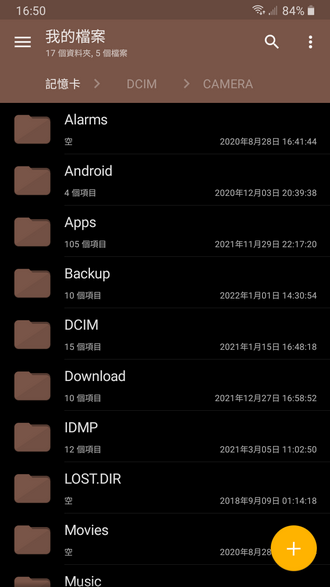
【軟體截圖】:
👉 GM後台版 遊戲 推薦 ⬇️⬇️⬇️ 快速玩各種二次元動漫手遊app
常見問題Q&A
Q:這個版本需要 Root 才能使用嗎?
A:不需要。一般檔案管理功能無需 Root。只有當你需要修改系統檔案時,才需要裝置已取得 Root 權限,軟體內的 Root 資源管理器功能才會啟用。
Q:這是官方中文版嗎?
A:是的,軟體本身內建繁體中文介面,下載安裝後即可使用。
Q:如何安裝這個 APK 檔案?
A:下載 APK 檔案後,點擊它進行安裝。如果系統阻止安裝,請先到手機的「設定」中,開啟「允許安裝來自未知來源的應用程式」選項,即可順利安裝。
以下廣告滑動後還有帖子內容var custom_call_MIR = function (params) {if ( params === null || params.hasAd === false ) {var divRowSide;for (let index = 0; index < ONEADs.length; index++) {if (ONEADs[index].pub.player_mode === "mobile-inread") {divRowSide = ONEADs[index].pub.slotobj;}}var ins = document.createElement('ins');ins.className = 'clickforceads';ins.setAttribute('style', 'display:inline-block;');ins.setAttribute('data-ad-zone', '18264');divRowSide.appendChild(ins);var js = document.createElement('script');js.async = true;js.type = 'text/javascript';js.setAttribute('src', '//cdn.holmesmind.com/js/init.js');js.onload = function(){console.log('[ONEAD MIR] ClickForce Loaded');};divRowSide.appendChild(js);}};var _ONEAD = {};_ONEAD.pub = {};_ONEAD.pub.slotobj = document.getElementById("oneadMIRDFPTag");_ONEAD.pub.slots = ["div-onead-ad"];_ONEAD.pub.uid = "1000509";_ONEAD.pub.external_url = "https://onead.onevision.com.tw/";_ONEAD.pub.scopes = ["spotbuy", "speed"];_ONEAD.pub.player_mode_div = "div-onead-ad";_ONEAD.pub.player_mode = "mobile-inread";_ONEAD.pub.queryAdCallback = custom_call_MIR;var ONEAD_pubs = ONEAD_pubs || [];ONEAD_pubs.push(_ONEAD);var truvidScript = document.createElement('script'); truvidScript.async = true; truvidScript.setAttribute('data-cfasync','false'); truvidScript.type = 'text/javascript'; truvidScript.src = '//stg.truvidplayer.com/index.php?sub_user_id=597&widget_id=3309&playlist_id=2381&m=a&cb=' + (Math.random() * 10000000000000000); var currentScript = document.currentScript || document.scripts[document.scripts.length - 1]; currentScript.parentNode.insertBefore(truvidScript, currentScript.nextSibling);
【附件下載】:
Solid Explorer File Manager v3.2.10.apk



 組圖開啟中,請稍候......
 收藏
收藏
