正文摘要:
《Windows 10/11 LTSC》核心主題 快速閱讀精華
懶人包重點:
🚀 一次打包三版本:包含 Win10 LTSC 21H2、22H2 以及 Win11 LTSC,滿足不同需求。🔑 純淨正體中文:系統語言為中文,移除多餘元件,提供更乾淨的作業環境。🛡️ LTSC 長期服務版:相較一般版本,更新頻率低、穩定性高,適合追求系統穩定的使用者。💾 龐大檔案注意:單一映像檔約 10.7GB,請預留足夠的硬碟空間與準備 USB 隨身碟進行安裝。⚠️ 啟用需自理:本文僅提供官方純淨系統映像檔,系統啟用需使用者自行處理。
.article-toc { border: 1px solid #ddd; padding: 15px; background: #f9f9f9; border-radius: 6px; margin: 20px 0; width: 90%;}.article-toc br { display: none;}.toc-title { /* --- 以下是合併進來的 H2 樣式 --- */ font-size: 1.25em; /* 125% */ border-left: 5px solid #2A98DA; border-radius: 2px; padding: 5px 0px 5px 10px; font-weight: bold; margin: 0 0 15px 0; /* 調整了 margin,只留下方 15px */ color: #333; line-height: 1.5; background-color: #f8f8f8; /* --- 樣式合併結束 --- */}.toc-list { list-style: none; padding-left: 0;}.toc-list li { margin: 8px 0;}.toc-list a { color: #2A98DA; text-decoration: none;}.toc-list a:hover { text-decoration: underline;}.back-to-top { display: block; margin-top: 10px; font-size: 0.9em; color: #666;}本文章目錄
軟體規格資訊document.currentScript.previousElementSibling.href = location.href.split('#')[0] + '#info';
軟體截圖document.currentScript.previousElementSibling.href = location.href.split('#')[0] + '#screenshot';
常見問題Q&Adocument.currentScript.previousElementSibling.href = location.href.split('#')[0] + '#faq';
附件下載 🔽document.currentScript.previousElementSibling.href = location.href.split('#')[0] + '#download';
【語 言】:中文 (正體中文)
【軟體名稱】:Windows 10 LTSC + Windows 11 LTSC 三合一整合版
【版本資訊】:v19044.6691 (Win10 LTSC 21H2) / v19045.6691 (Win10 LTSC 22H2) / v26200.7462 (Win11 LTSC)
【軟體大小】:約 10.7 GB
【更新日期】:2025年12月29日
【使用權限】:官方純淨系統映像 (需自行啟用)
【系統支持】:64位元作業系統 (x64)
【軟體介紹】:
這是一個專為遊戲使用者準備的 Windows 系統整合映像檔,裡面一次打包了三個微軟的 LTSC (長期服務通道) 版本,分別是 Windows 10 LTSC 21H2、Windows 10 LTSC 22H2 以及最新的 Windows 11 LTSC。對於不喜歡頻繁功能更新、追求系統穩定與流暢度的用戶來說,LTSC 版本是非常理想的選擇。
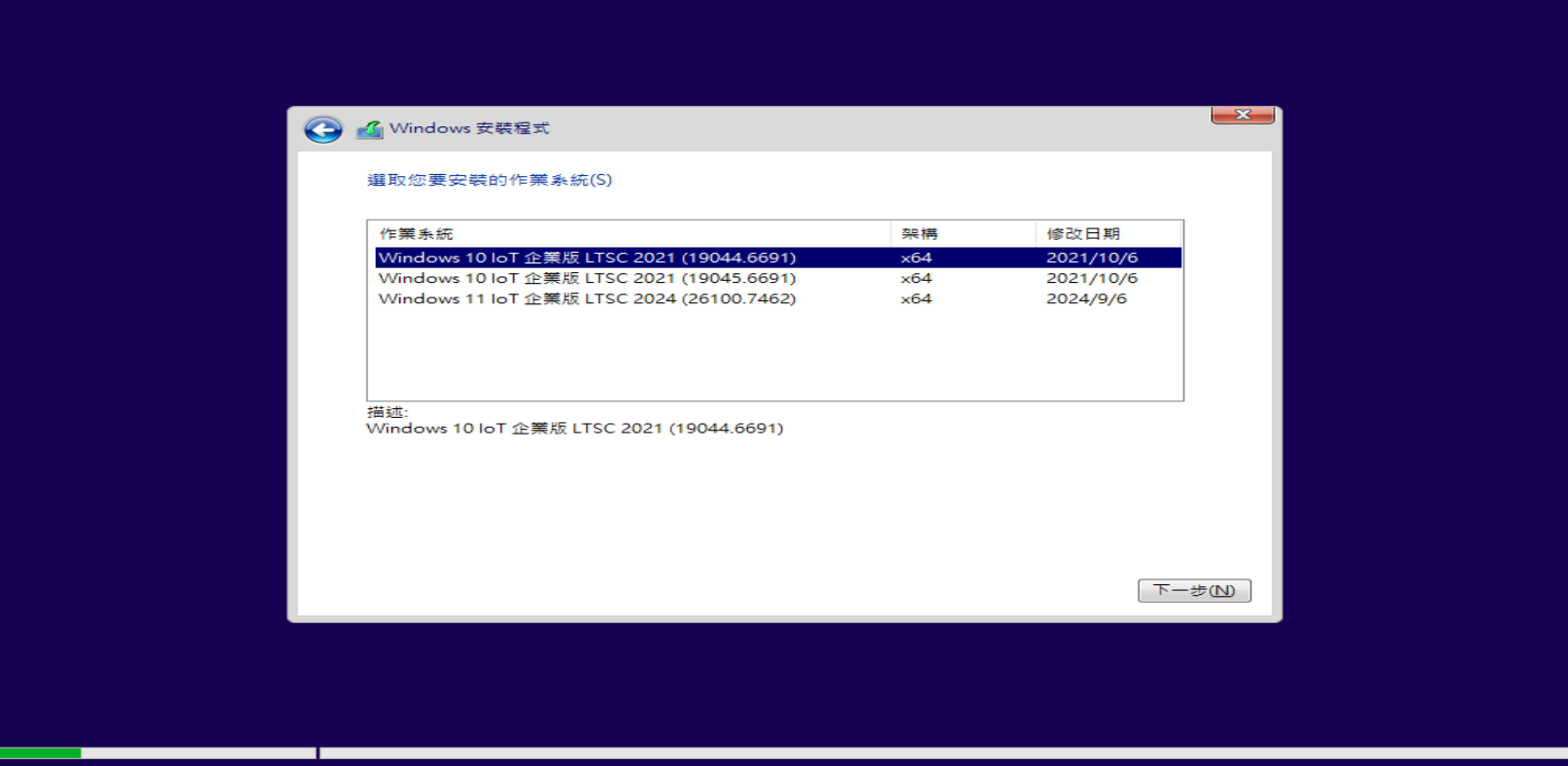
如何安裝這個三合一系統呢?首先,你需要將下載回來的約 10.7GB 的 .ISO 映像檔,使用 Rufus 或微軟官方工具製作成 USB 開機安裝碟。步驟心得分享如下:準備一個容量至少 16GB 的 USB 隨身碟,透過燒錄工具選擇下載好的 ISO 檔案,寫入完成後,重啟電腦並從 USB 裝置開機,就能進入熟悉的 Windows 安裝介面,並可以自由選擇要安裝上述三個版本中的哪一個。
請務必注意,這個映像檔僅包含純淨的系統安裝檔案,不包含任何破解或啟用工具。安裝完成後,系統的啟用需要您自行準備合法的產品金鑰或透過其他官方認可的管道進行。對於老舊電腦想要升級到 Windows 11 的使用者,因為此 Win11 LTSC 版本是以 Win10 為基底建構,相容性會比一般消費版更好,是個值得一試的升級方案。
【軟體截圖】:
👉 GM後台版 遊戲 推薦 ⬇️⬇️⬇️ 快速玩各種二次元動漫手遊app
常見問題Q&A
Q:我想要為我的老電腦安裝 Windows 11 LTSC,請問可以嗎?
A:可以的,因為這個映像檔中的 Windows 11 LTSC 是使用 Windows 10 作為基底製作的,對硬體的要求相對寬鬆,老電腦有更高的機會可以成功安裝並運行。
Q:LTSC 請問有什麼優點嗎?
A:有的!LTSC (長期服務通道) 版本主要提供長達 10 年的安全性更新支持,但不會強制推送頻繁的功能性更新。這意味著系統更穩定,不會因為大版本更新而出現相容性問題,非常適合用於生產力環境或不想被更新打擾的使用者。
Q:Windows 10 LTSC 的 22H2 版本是否可以接收更新?
A:可能會出現更新失敗等問題。如果您追求極致的系統穩定性,建議選擇安裝 21H2 版本,其作為 LTSC 的初始版本,在更新相容性上通常被認為是最穩定的。
以下廣告滑動後還有帖子內容var custom_call_MIR = function (params) {if ( params === null || params.hasAd === false ) {var divRowSide;for (let index = 0; index < ONEADs.length; index++) {if (ONEADs[index].pub.player_mode === "mobile-inread") {divRowSide = ONEADs[index].pub.slotobj;}}var ins = document.createElement('ins');ins.className = 'clickforceads';ins.setAttribute('style', 'display:inline-block;');ins.setAttribute('data-ad-zone', '18264');divRowSide.appendChild(ins);var js = document.createElement('script');js.async = true;js.type = 'text/javascript';js.setAttribute('src', '//cdn.holmesmind.com/js/init.js');js.onload = function(){console.log('[ONEAD MIR] ClickForce Loaded');};divRowSide.appendChild(js);}};var _ONEAD = {};_ONEAD.pub = {};_ONEAD.pub.slotobj = document.getElementById("oneadMIRDFPTag");_ONEAD.pub.slots = ["div-onead-ad"];_ONEAD.pub.uid = "1000509";_ONEAD.pub.external_url = "https://onead.onevision.com.tw/";_ONEAD.pub.scopes = ["spotbuy", "speed"];_ONEAD.pub.player_mode_div = "div-onead-ad";_ONEAD.pub.player_mode = "mobile-inread";_ONEAD.pub.queryAdCallback = custom_call_MIR;var ONEAD_pubs = ONEAD_pubs || [];ONEAD_pubs.push(_ONEAD);var truvidScript = document.createElement('script'); truvidScript.async = true; truvidScript.setAttribute('data-cfasync','false'); truvidScript.type = 'text/javascript'; truvidScript.src = '//stg.truvidplayer.com/index.php?sub_user_id=597&widget_id=3309&playlist_id=2381&m=a&cb=' + (Math.random() * 10000000000000000); var currentScript = document.currentScript || document.scripts[document.scripts.length - 1]; currentScript.parentNode.insertBefore(truvidScript, currentScript.nextSibling);
【附件下載】:
pcloud 下載連結 (約 10.7GB)



 組圖開啟中,請稍候......
 收藏
收藏
