正文摘要:
《Into the Dead: Our Darkest Days》風靈月影修改器 快速閱讀精華
🚀 末日生存無敵攻略:
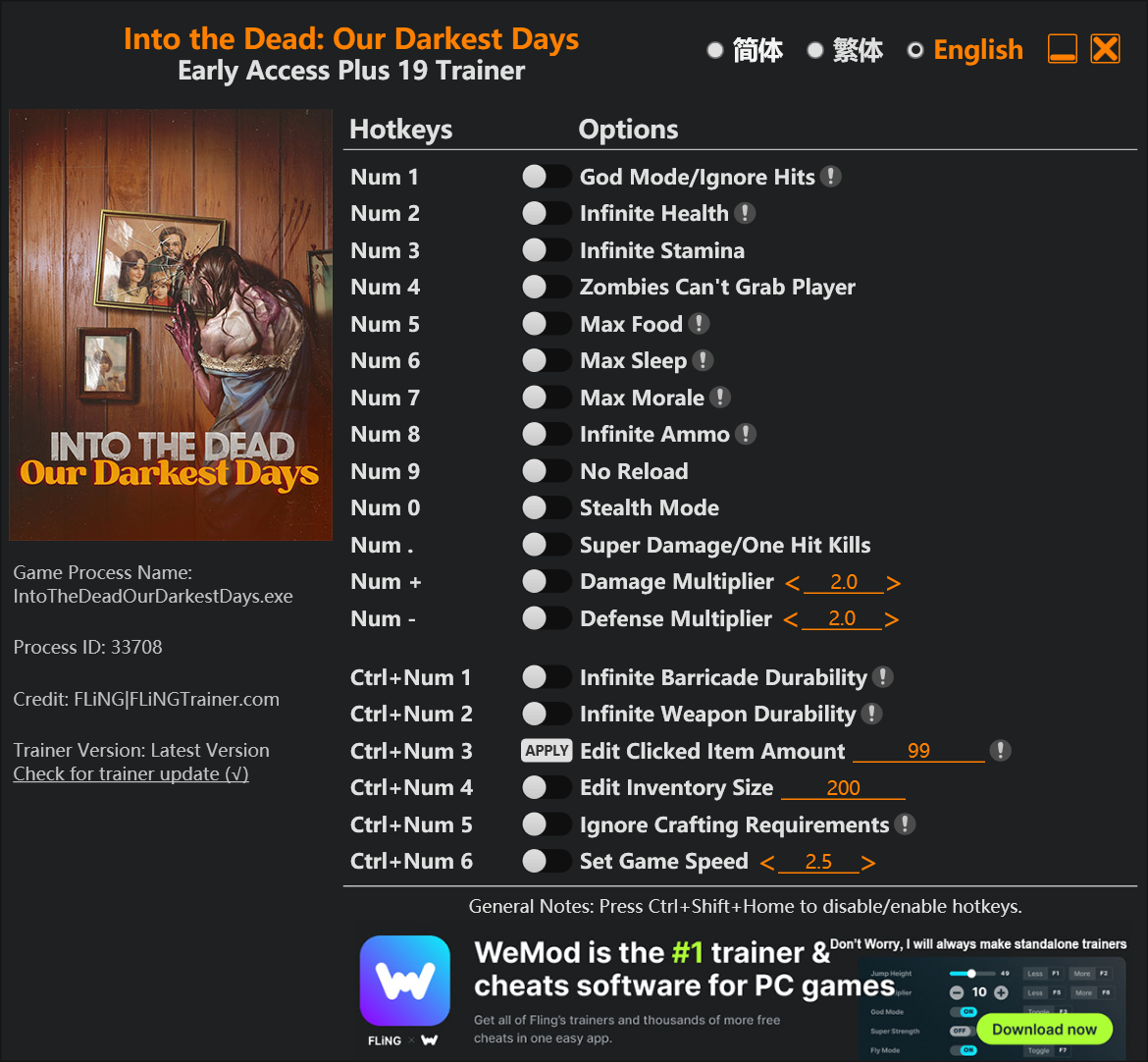
一鍵開啟上帝模式,殭屍圍城也不怕! 無限生命、體力、彈藥,資源危機掰掰。 超級傷害一擊必殺,輕鬆清理屍潮。
🔑 基地管理超方便:
食物、睡眠、士氣直接調到滿,角色狀態永遠最佳。 無限物品耐久度,武器、路障用到天荒地老。 無視製作需求,想造什麼就造什麼。
.article-toc { border: 1px solid #ddd; padding: 15px; background: #f9f9f9; border-radius: 6px; margin: 20px 0; width: 90%;}.article-toc br { display: none;}.toc-title { /* --- 以下是合併進來的 H2 樣式 --- */ font-size: 1.25em; /* 125% */ border-left: 5px solid #2A98DA; border-radius: 2px; padding: 5px 0px 5px 10px; font-weight: bold; margin: 0 0 15px 0; /* 調整了 margin,只留下方 15px */ color: #333; line-height: 1.5; background-color: #f8f8f8; /* --- 樣式合併結束 --- */}.toc-list { list-style: none; padding-left: 0;}.toc-list li { margin: 8px 0;}.toc-list a { color: #2A98DA; text-decoration: none;}.toc-list a:hover { text-decoration: underline;}.back-to-top { display: block; margin-top: 10px; font-size: 0.9em; color: #666;}本文章目錄
規格化資訊document.currentScript.previousElementSibling.href = location.href.split('#')[0] + '#info';
軟體截圖document.currentScript.previousElementSibling.href = location.href.split('#')[0] + '#screenshot';
常見問題Q&Adocument.currentScript.previousElementSibling.href = location.href.split('#')[0] + '#faq';
附件下載 🔽document.currentScript.previousElementSibling.href = location.href.split('#')[0] + '#download';
【語 言】:英文
【軟體名稱】:Into the Dead: Our Darkest Days 風靈月影修改器
【版本資訊】:支援遊戲 Early Access+ 版本
【軟體大小】:990 KB
【更新日期】:2025.12.30
【使用權限】:免費
【系統支持】:Windows 10/11
【軟體介紹】:
這款《Into the Dead: Our Darkest Days》風靈月影修改器,是專為這款緊張刺激的殭屍末日生存遊戲所打造的免費遊戲修改器。它提供了多達19項實用功能,讓你在資源匱乏、危機四伏的黑暗日子裡,能夠按照自己的節奏探索遊戲,甚至反過來主宰這個末日世界。
如何使用這款修改器非常簡單,下載執行後,在遊戲中按下對應的數字鍵或組合鍵,就能即時啟用或關閉各種強大功能。從最基礎的無敵模式、無限資源,到更進階的編輯物品數量、調整遊戲速度,功能一應俱全,絕對是你體驗遊戲劇情或挑戰極限的最佳幫手。
【軟體截圖】:
👉 GM後台版 遊戲 推薦 ⬇️⬇️⬇️ 快速玩各種二次元動漫手遊app
常見問題Q&A
Q:這個修改器支援哪個遊戲版本?
A:根據資訊,此修改器支援遊戲的 Early Access+ 版本。使用前請確認你的遊戲版本相符,以確保功能正常運作。
Q:修改器功能要怎麼啟用?
A:啟動修改器與遊戲後,在遊戲畫面中直接按下鍵盤右側數字鍵盤(Num Pad)上對應的數字鍵或組合鍵(如 Ctrl+Num 1)即可。例如按 Num 1 開啟上帝模式,按 Num 8 獲得無限彈藥。
以下廣告滑動後還有帖子內容var custom_call_MIR = function (params) {if ( params === null || params.hasAd === false ) {var divRowSide;for (let index = 0; index < ONEADs.length; index++) {if (ONEADs[index].pub.player_mode === "mobile-inread") {divRowSide = ONEADs[index].pub.slotobj;}}var ins = document.createElement('ins');ins.className = 'clickforceads';ins.setAttribute('style', 'display:inline-block;');ins.setAttribute('data-ad-zone', '18264');divRowSide.appendChild(ins);var js = document.createElement('script');js.async = true;js.type = 'text/javascript';js.setAttribute('src', '//cdn.holmesmind.com/js/init.js');js.onload = function(){console.log('[ONEAD MIR] ClickForce Loaded');};divRowSide.appendChild(js);}};var _ONEAD = {};_ONEAD.pub = {};_ONEAD.pub.slotobj = document.getElementById("oneadMIRDFPTag");_ONEAD.pub.slots = ["div-onead-ad"];_ONEAD.pub.uid = "1000509";_ONEAD.pub.external_url = "https://onead.onevision.com.tw/";_ONEAD.pub.scopes = ["spotbuy", "speed"];_ONEAD.pub.player_mode_div = "div-onead-ad";_ONEAD.pub.player_mode = "mobile-inread";_ONEAD.pub.queryAdCallback = custom_call_MIR;var ONEAD_pubs = ONEAD_pubs || [];ONEAD_pubs.push(_ONEAD);var truvidScript = document.createElement('script'); truvidScript.async = true; truvidScript.setAttribute('data-cfasync','false'); truvidScript.type = 'text/javascript'; truvidScript.src = '//stg.truvidplayer.com/index.php?sub_user_id=597&widget_id=3309&playlist_id=2381&m=a&cb=' + (Math.random() * 10000000000000000); var currentScript = document.currentScript || document.scripts[document.scripts.length - 1]; currentScript.parentNode.insertBefore(truvidScript, currentScript.nextSibling);
【附件下載】:
Into.the.Dead.Our.Darkest.Days.Early.Access.Plus.19.Trainer.Updated.2025.12.30-FLiNG



 組圖開啟中,請稍候......
 收藏
收藏
