正文摘要:
《AT Player》核心主題 快速閱讀精華
🚀 一鍵下載超方便:
支援搜尋與下載國內外多平臺音樂,從Podcasts到YouTube音樂都能串流。 內建智慧下載引擎,快速下載MP3格式音樂,離線收聽沒煩惱。 獨家懸浮播放器與播放器鎖定模式,邊用其他App邊聽歌超省電。
.article-toc { border: 1px solid #ddd; padding: 15px; background: #f9f9f9; border-radius: 6px; margin: 20px 0; width: 90%;}.article-toc br { display: none;}.toc-title { /* --- 以下是合併進來的 H2 樣式 --- */ font-size: 1.25em; /* 125% */ border-left: 5px solid #2A98DA; border-radius: 2px; padding: 5px 0px 5px 10px; font-weight: bold; margin: 0 0 15px 0; /* 調整了 margin,只留下方 15px */ color: #333; line-height: 1.5; background-color: #f8f8f8; /* --- 樣式合併結束 --- */}.toc-list { list-style: none; padding-left: 0;}.toc-list li { margin: 8px 0;}.toc-list a { color: #2A98DA; text-decoration: none;}.toc-list a:hover { text-decoration: underline;}.back-to-top { display: block; margin-top: 10px; font-size: 0.9em; color: #666;}本文章目錄
軟體規格資訊document.currentScript.previousElementSibling.href = location.href.split('#')[0] + '#info';
軟體功能介紹與安裝教學document.currentScript.previousElementSibling.href = location.href.split('#')[0] + '#intro';
軟體截圖document.currentScript.previousElementSibling.href = location.href.split('#')[0] + '#screenshot';
附件下載 🔽document.currentScript.previousElementSibling.href = location.href.split('#')[0] + '#download';
【語 言】:多國語言 (含中文)
【軟體名稱】:AT Player
【版本資訊】:v20260109
【軟體大小】:26 MB
【更新日期】:2026-01-11
【使用權限】:免費版
【系統支持】:Android
【軟體介紹】:
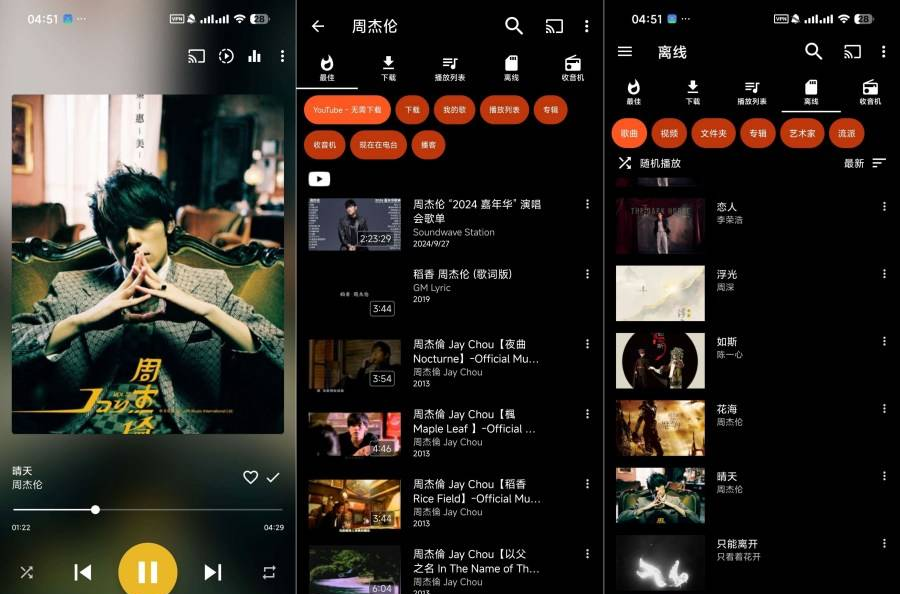
AT Player是一款功能超豐富的音樂播放器兼下載神器!它讓你可以無限下載和串流免費的音樂與影片。想知道如何安裝與使用嗎?步驟心得分享看這邊!
這款App最厲害的地方在於,它支援搜尋音樂、播放清單、專輯、歌手,甚至能識別附近的音樂並下載。你可以從Podcasts、Dropbox和Jamendo等平臺下載音樂,存起來離線聽。雖然它也能串流播放YouTube音樂,但要注意的是,YouTube音樂目前無法直接下載喔!
對於喜歡多工處理的朋友,AT Player的懸浮彈出播放器完全可自訂,讓你一邊逛社羣、看文章,一邊控制音樂播放超方便。還有播放器鎖定模式和省電模式,能幫你節省電力,長時間享受音樂不中斷。
它的智慧下載引擎也是一大亮點,可以快速幫你下載各種風格的MP3音樂,無論是流行、搖滾還是古典,都能輕鬆收藏。
【軟體截圖】:
👉 GM後台版 遊戲 推薦 ⬇️⬇️⬇️ 快速玩各種二次元動漫手遊app
【附件下載】:
藍奏下載
推薦->藍奏雲快速直連整理下載網址
藍奏地址打不開教學:lanzoul 改成lanzoux 就是把l替換成m或者w 即可正常訪問《123雲盤》免中國電話免註冊下載 APP安裝、免會員VIP高速下載BUG利用、檔案管理完整教學
百度網盤



 組圖開啟中,請稍候......
 收藏
收藏
