正文摘要:
《逆戰未來》倉庫系統 全面攻略 快速閱讀精華
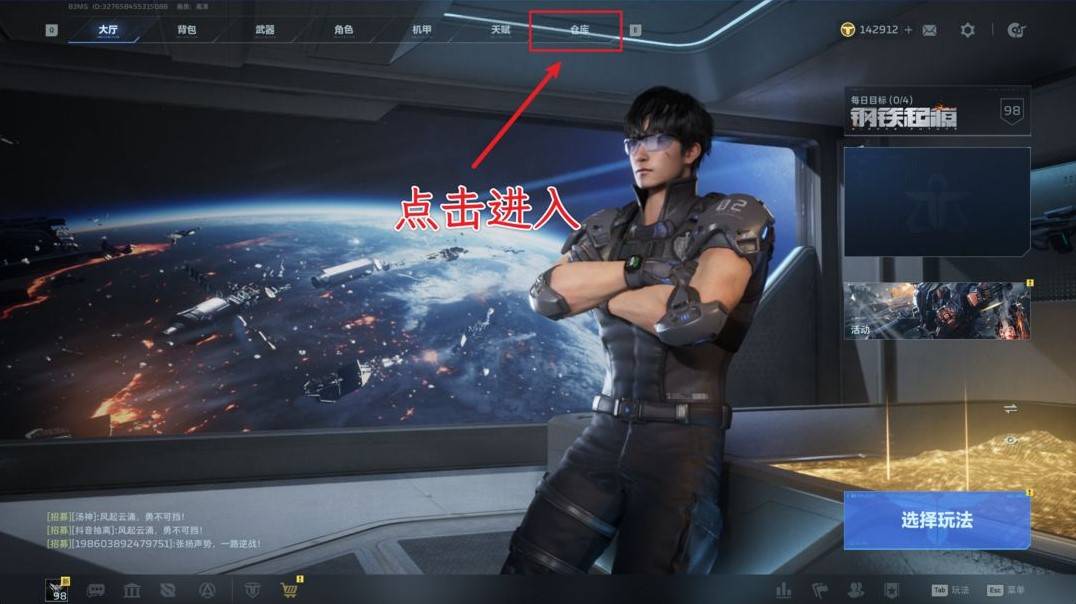
🚀 快速入口: 在遊戲大廳上方,輕鬆點擊「倉庫」即可進入。💪 核心功能總覽:
武器管理:檢視、配置、篩選與分享你的所有武器。插件強化:瞭解插件圖鑑、分解多餘插件,並製造心願插件。藍圖合成:透過藍圖合成永久金色武器,或轉化為傳說槍械幣兌換所需藍圖。道具運用:開啟活動寶箱、使用體驗卡等。
🔑 善用篩選: 武器與插件頁面皆提供多種篩選規則,助你快速找到目標。⚙️ 資源活化: 多餘插件可分解為「量子振芯」製造新插件;多餘藍圖可轉化為「傳說槍械幣」兌換稀有藍圖。
.article-toc { border: 1px solid #ddd; padding: 15px; background: #f9f9f9; border-radius: 6px; margin: 20px 0; width: 90%;}.article-toc br { display: none;}.toc-title { /* --- 以下是合併進來的 H2 樣式 --- */ font-size: 1.25em; /* 125% */ border-left: 5px solid #2A98DA; border-radius: 2px; padding: 5px 0px 5px 10px; font-weight: bold; margin: 0 0 15px 0; /* 調整了 margin,只留下方 15px */ color: #333; line-height: 1.5; background-color: #f8f8f8; /* --- 樣式合併結束 --- */}.toc-list { list-style: none; padding-left: 0;}.toc-list li { margin: 8px 0;}.toc-list a { color: #2A98DA; text-decoration: none;}.toc-list a:hover { text-decoration: underline;}.back-to-top { display: block; margin-top: 10px; font-size: 0.9em; color: #666;}本文章目錄
進入倉庫系統:你的個人軍械庫document.currentScript.previousElementSibling.href = location.href.split('#')[0] + '#intro';
倉庫總覽:掌握你的所有資產document.currentScript.previousElementSibling.href = location.href.split('#')[0] + '#overview';
- 武器頁面:打造專屬戰力document.currentScript.previousElementSibling.href = location.href.split('#')[0] + '#weapons';
-- 武器詳細資訊一覽document.currentScript.previousElementSibling.href = location.href.split('#')[0] + '#weapon_details';
-- 高效篩選,快速定位武器document.currentScript.previousElementSibling.href = location.href.split('#')[0] + '#weapon_filter';
-- 武器分享與深度探索document.currentScript.previousElementSibling.href = location.href.split('#')[0] + '#weapon_share';
- 武器插件:強化你的核心戰力document.currentScript.previousElementSibling.href = location.href.split('#')[0] + '#plugins';
-- 插件圖鑑與解鎖獎勵document.currentScript.previousElementSibling.href = location.href.split('#')[0] + '#plugin_codex';
-- 插件分解與量子振芯運用document.currentScript.previousElementSibling.href = location.href.split('#')[0] + '#plugin_decompose';
-- 心願插件製造,加速戰力提升document.currentScript.previousElementSibling.href = location.href.split('#')[0] + '#plugin_craft';
- 道具、裝置槍與武器藍圖document.currentScript.previousElementSibling.href = location.href.split('#')[0] + '#others';
-- 道具管理:開啟寶箱與體驗卡document.currentScript.previousElementSibling.href = location.href.split('#')[0] + '#items';
-- 裝置槍:未來潛力無限document.currentScript.previousElementSibling.href = location.href.split('#')[0] + '#device_guns';
-- 武器藍圖:合成金色永久武器document.currentScript.previousElementSibling.href = location.href.split('#')[0] + '#blueprints';
-- 藍圖轉化與傳說槍械幣document.currentScript.previousElementSibling.href = location.href.split('#')[0] + '#blueprint_convert';
《逆戰未來》倉庫系統_常見問題Q&Adocument.currentScript.previousElementSibling.href = location.href.split('#')[0] + '#faq';
進入倉庫系統:你的個人軍械庫
在《逆戰未來》中,倉庫系統扮演著關鍵的角色,是每位逆行者管理戰備資源的核心基地。許多玩家可能好奇,這個系統到底有哪些功能?我們要如何善用它來提升戰力呢?
其實非常簡單!當你在遊戲大廳時,只要點擊畫面正上方欄位中的「倉庫」按鈕,就能立刻進入你的個人倉庫頁面。
我們必須特別提醒,這類槍械幣僅能兌換金色品質的武器藍圖(不包含金色品質近戰武器)。對於其他品質(藍、紫)的武器藍圖,以及所有近戰武器的藍圖,都是無法兌換的,這點務必牢記。
《逆戰未來》重點回顧
倉庫系統是《逆戰未來》中管理所有戰備資源的核心,包含武器、插件、道具及藍圖。善用篩選、分享功能,並透過插件分解與藍圖轉化機制,能有效活化資源,加速戰力成長。定期檢查倉庫,妥善規劃資源,是每位逆行者提升實力的關鍵。
《逆戰未來》倉庫系統_常見問題Q&A
Q:我怎麼進入《逆戰未來》的倉庫系統?
A:在遊戲大廳的上方,你會看到一個「倉庫」按鈕,點擊它就可以輕鬆進入了。
Q:倉庫主要有哪些功能?
A:倉庫是一個綜合性的管理界面,包含武器、武器插件、道具、裝置槍和武器藍圖的管理。你可以查看裝備詳情、進行篩選、分解多餘物品,甚至合成更強力的裝備。
Q:我的武器插件太多了怎麼辦?能分解嗎?
A:可以的!你可以進入「倉庫 → 武器插件」頁面,點擊「前往分解」,將多餘或品質較低的插件分解為「量子振芯」,以騰出空間並獲取資源。
Q:量子振芯有什麼用?
A:量子振芯主要用於「插件製造」。你可以選擇5個心願插件,消耗量子振芯來隨機獲得其中一個,是加速獲取所需插件的好方法。
Q:我有很多重複的武器藍圖,怎麼換成我想要的?
A:你可以將多餘的武器藍圖點擊「轉化」,轉化為「傳說槍械幣」。然後再到「前往製造」界面,消耗傳說槍械幣兌換你真正需要的金色品質武器藍圖。請注意,這僅限於金色品質的武器藍圖(不含近戰)。
[ad123]1[/ad183]



 組圖開啟中,請稍候......
 收藏
收藏
