正文摘要:
《Aiarty Image Enhancer》核心主題 快速閱讀精華
🚀 一鍵AI增強超簡單:
AI智慧調整亮度、對比度、飽和度,照片質感瞬間升級! 內建背景模糊工具,輕鬆虛化背景,主體更突出。 提供多種濾鏡效果,讓你的圖片風格百變。
⚡ 批量處理超高效:
支援一次處理多張圖片,省時又省力。 快速修復紅眼、瑕疵,照片完美無缺。 操作介面直覺簡單,拖放就能完成編輯。
.article-toc { border: 1px solid #ddd; padding: 15px; background: #f9f9f9; border-radius: 6px; margin: 20px 0; width: 90%;}.article-toc br { display: none;}.toc-title { /* --- 以下是合併進來的 H2 樣式 --- */ font-size: 1.25em; /* 125% */ border-left: 5px solid #2A98DA; border-radius: 2px; padding: 5px 0px 5px 10px; font-weight: bold; margin: 0 0 15px 0; /* 調整了 margin,只留下方 15px */ color: #333; line-height: 1.5; background-color: #f8f8f8; /* --- 樣式合併結束 --- */}.toc-list { list-style: none; padding-left: 0;}.toc-list li { margin: 8px 0;}.toc-list a { color: #2A98DA; text-decoration: none;}.toc-list a:hover { text-decoration: underline;}.back-to-top { display: block; margin-top: 10px; font-size: 0.9em; color: #666;}本文章目錄
規格化資訊document.currentScript.previousElementSibling.href = location.href.split('#')[0] + '#info';
軟體截圖document.currentScript.previousElementSibling.href = location.href.split('#')[0] + '#screenshot';
附件下載 🔽document.currentScript.previousElementSibling.href = location.href.split('#')[0] + '#download';
【語 言】:多國語言(支援繁體中文)
【軟體名稱】:Aiarty Image Enhancer (AI圖片增強工具)
【版本資訊】:v3.9
【軟體大小】:請參照下載檔案大小
【更新日期】:資料庫日期
【使用權限】:便攜版
【系統支持】:Windows PC
【軟體介紹】:
《Aiarty Image Enhancer》是一款專為提升圖片品質而生的強大AI工具,無論你是攝影愛好者還是社羣小編,都能輕鬆上手。它利用人工智慧技術,自動幫你優化照片的亮度、對比度和色彩飽和度,讓平淡無奇的照片立刻變得生動鮮明。
除了基本的增強功能,軟體還內建了實用的「背景模糊」工具,只要簡單操作,就能讓照片背景產生自然的景深效果,完美凸顯拍攝主體。內建的多款濾鏡,更能為你的圖片快速套上不同風格,省去複雜的後製步驟。
最棒的是,它支援「批量處理」功能,如果你有一整批照片需要調色或套用相同效果,不用再一張張手動調整,一次就能全部搞定,工作效率大幅提升。軟體還附帶快速修復功能,能輕鬆移除照片中的紅眼或小瑕疵。
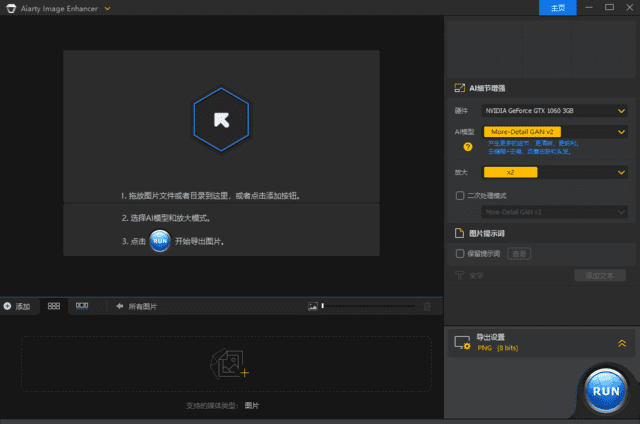
整體介面設計得非常簡潔直覺,透過拖放檔案就能開始編輯,處理速度也很快,是一款兼具功能與便利性的圖片增強好幫手。
【軟體截圖】:
👉 GM後台版 遊戲 推薦 ⬇️⬇️⬇️ 快速玩各種二次元動漫手遊app
【附件下載】:
Aiarty Image Enhancer(AI圖片增強工具) v3.9 多語便攜版 (夸克雲)
Aiarty Image Enhancer(AI圖片增強工具) v3.9 多語便攜版 (城通盤,訪問密碼: 2023)
Aiarty Image Enhancer(AI圖片增強工具) v3.9 多語便攜版 (百度雲,提取碼: ri9w)
Aiarty Image Enhancer(AI圖片增強工具) v3.9 多語便攜版 (123盤)



 組圖開啟中,請稍候......
 收藏
收藏
