正文摘要:
《息風谷戰略》內置修改器 快速閱讀精華
🚀 核心功能:
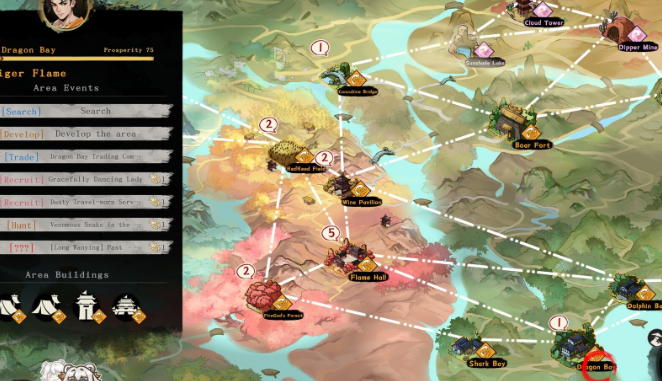
F9 一鍵呼叫: 進入遊戲後按下 F9 即可開啟修改面板,無需複雜設定。神裝製造機: 支援自選裝備詞條,且數值與數量直接拉滿至最高品質。劇情全解鎖: 擔心錯過門派劇情?透過面板直接查看所有可執行劇情。
🛠️ 進階編輯:
腳本可視化: 內建可視化腳本編輯器,支援多標籤管理與跨檔案查找。防閃退續寫: 編輯到一半遊戲崩潰?意外續寫功能保護你的心血。
🆕 最新優化: 1月31日最新版重構了 UI 介面,新增滾動條與圖示,操作更滑順。
.article-toc { border: 1px solid #ddd; padding: 15px; background: #f9f9f9; border-radius: 6px; margin: 20px 0; width: 90%;}.article-toc br { display: none;}.toc-title { /* --- 以下是合併進來的 H2 樣式 --- */ font-size: 1.25em; /* 125% */ border-left: 5px solid #2A98DA; border-radius: 2px; padding: 5px 0px 5px 10px; font-weight: bold; margin: 0 0 15px 0; /* 調整了 margin,只留下方 15px */ color: #333; line-height: 1.5; background-color: #f8f8f8; /* --- 樣式合併結束 --- */}.toc-list { list-style: none; padding-left: 0;}.toc-list li { margin: 8px 0;}.toc-list a { color: #2A98DA; text-decoration: none;}.toc-list a:hover { text-decoration: underline;}.back-to-top { display: block; margin-top: 10px; font-size: 0.9em; color: #666;}本文章目錄引言:重振虎焰門的捷徑document.currentScript.previousElementSibling.href = location.href.split('#')[0] + '#intro';
風險聲明與注意事項document.currentScript.previousElementSibling.href = location.href.split('#')[0] + '#risk_warning';
安裝與使用教學document.currentScript.previousElementSibling.href = location.href.split('#')[0] + '#install_guide';
核心功能詳解document.currentScript.previousElementSibling.href = location.href.split('#')[0] + '#core_features';
- 視覺化腳本編輯器document.currentScript.previousElementSibling.href = location.href.split('#')[0] + '#script_editor';
- 最強裝備自選詞條document.currentScript.previousElementSibling.href = location.href.split('#')[0] + '#equip_maker';
- 劇情查看與防錯過document.currentScript.previousElementSibling.href = location.href.split('#')[0] + '#story_tool';
近期更新日誌document.currentScript.previousElementSibling.href = location.href.split('#')[0] + '#update_log';
修改器下載連結 🔽document.currentScript.previousElementSibling.href = location.href.split('#')[0] + '#download_link';
常見問題Q&Adocument.currentScript.previousElementSibling.href = location.href.split('#')[0] + '#faq';
引言:重振虎焰門的捷徑
身為虎焰門的少主,你是否覺得復興門派的路途太過漫長?想要快速體驗遊戲劇情,卻被繁瑣的資源收集和練功拖慢了腳步?又或者你已經是多周目玩家,想要嘗試各種極限流派(Build),卻苦於刷不到完美的詞條裝備?
別擔心,這篇教學要介紹的這款「內置修改器」,絕對是你稱霸息風谷的最佳幫手!這不僅僅是一個簡單的數值修改工具,它更像是一個強大的「遊戲控制台」。我們團隊實際測試後發現,它能讓你直接在遊戲中編輯腳本、生成神級裝備,甚至還能幫你補完錯過的劇情。想當個真正的天選之人?跟著我們看下去就對了!
風險聲明與注意事項
在使用本工具之前,請務必閱讀以下提醒:
本工具功能強大,過度修改可能會破壞遊戲的挑戰性與樂趣,建議新手玩家先體驗原汁原味的遊戲內容。涉及腳本編輯的功能屬於進階操作,修改前建議備份您的存檔,以免發生不可逆的錯誤。雖然本工具支援防閃退續寫,但頻繁修改遊戲核心數據仍有崩潰風險。
修改器下載連結 🔽
本工具已上架 Steam 創意工坊,請點擊下方連結進行訂閱。
https://steamcommunity.com/sharedfiles/filedetails/?id=3651051172
以下廣告滑動後還有帖子內容var custom_call_MIR = function (params) {if ( params === null || params.hasAd === false ) {var divRowSide;for (let index = 0; index < ONEADs.length; index++) {if (ONEADs[index].pub.player_mode === "mobile-inread") {divRowSide = ONEADs[index].pub.slotobj;}}var ins = document.createElement('ins');ins.className = 'clickforceads';ins.setAttribute('style', 'display:inline-block;');ins.setAttribute('data-ad-zone', '18264');divRowSide.appendChild(ins);var js = document.createElement('script');js.async = true;js.type = 'text/javascript';js.setAttribute('src', '//cdn.holmesmind.com/js/init.js');js.onload = function(){console.log('[ONEAD MIR] ClickForce Loaded');};divRowSide.appendChild(js);}};var _ONEAD = {};_ONEAD.pub = {};_ONEAD.pub.slotobj = document.getElementById("oneadMIRDFPTag");_ONEAD.pub.slots = ["div-onead-ad"];_ONEAD.pub.uid = "1000509";_ONEAD.pub.external_url = "https://onead.onevision.com.tw/";_ONEAD.pub.scopes = ["spotbuy", "speed"];_ONEAD.pub.player_mode_div = "div-onead-ad";_ONEAD.pub.player_mode = "mobile-inread";_ONEAD.pub.queryAdCallback = custom_call_MIR;var ONEAD_pubs = ONEAD_pubs || [];ONEAD_pubs.push(_ONEAD);var truvidScript = document.createElement('script'); truvidScript.async = true; truvidScript.setAttribute('data-cfasync','false'); truvidScript.type = 'text/javascript'; truvidScript.src = '//stg.truvidplayer.com/index.php?sub_user_id=597&widget_id=3309&playlist_id=2381&m=a&cb=' + (Math.random() * 10000000000000000); var currentScript = document.currentScript || document.scripts[document.scripts.length - 1]; currentScript.parentNode.insertBefore(truvidScript, currentScript.nextSibling);
《息風谷戰略》內置修改器 常見問題Q&A
Q:我訂閱了模組,但進遊戲按 F9 沒反應怎麼辦?
首先請確認 Steam 是否已經下載並安裝完畢。如果還是沒反應,請檢查遊戲設定中是否開啟了模組支援,或者嘗試重啟 Steam 客戶端以強制刷新工作坊狀態。
Q:這個修改器會影響 Steam 成就解鎖嗎?
目前測試大部分功能不影響成就,但直接修改過關條件或使用無敵功能可能會讓部分挑戰類成就失去意義,建議謹慎使用。
Q:版本顯示是 1.0.5C,但我遊戲是舊版可以用嗎?
建議將遊戲更新至最新版本以獲得最佳兼容性。修改器的功能(如 DLL 注入)通常是針對特定遊戲版本開發的,舊版可能會導致崩潰或功能失效。
Q:我可以用這個工具修改角色的好感度嗎?
可以的,工具內包含修改各類標記(Flags)和屬性的功能,透過常用命令或腳本編輯,可以調整包括好感度在內的各項數據。
Q:使用「意外續寫」功能時,存檔會壞掉嗎?
「意外續寫」是針對編輯器環境的保護機制,主要保護你正在寫的腳本不丟失。但為了保險起見,我們強烈建議在進行任何大規模修改前,先手動備份您的遊戲存檔(Save Files)。
《息風谷戰略》內置修改器 重點回顧
按下 F9 即可在遊戲中隨時開啟強大的修改面板。利用 裝備生成功能,輕鬆獲得滿詞條、滿數值的神級裝備。透過 腳本編輯器 與 劇情查看功能,深度客製化遊戲體驗並確保不錯過任何精彩故事。



 組圖開啟中,請稍候......
 收藏
收藏
