正文摘要:
《極致TV》核心主題 快速閱讀精華
🚀 發燒級IPTV播放神器:
4K超清畫質低延遲,所有頻道精挑細選! 支援港澳臺直播源,電視家重生版一次滿足! 高度自定義介面,手機、電視、盒子三端通用! 內建多組直播源,開箱即用免設定!
.article-toc { border: 1px solid #ddd; padding: 15px; background: #f9f9f9; border-radius: 6px; margin: 20px 0; width: 90%;}.article-toc br { display: none;}.toc-title { /* --- 以下是合併進來的 H2 樣式 --- */ font-size: 1.25em; /* 125% */ border-left: 5px solid #2A98DA; border-radius: 2px; padding: 5px 0px 5px 10px; font-weight: bold; margin: 0 0 15px 0; /* 調整了 margin,只留下方 15px */ color: #333; line-height: 1.5; background-color: #f8f8f8; /* --- 樣式合併結束 --- */}.toc-list { list-style: none; padding-left: 0;}.toc-list li { margin: 8px 0;}.toc-list a { color: #2A98DA; text-decoration: none;}.toc-list a:hover { text-decoration: underline;}.back-to-top { display: block; margin-top: 10px; font-size: 0.9em; color: #666;}本文章目錄
軟體規格資訊document.currentScript.previousElementSibling.href = location.href.split('#')[0] + '#info';
功能特色心得分享document.currentScript.previousElementSibling.href = location.href.split('#')[0] + '#features';
軟體截圖預覽document.currentScript.previousElementSibling.href = location.href.split('#')[0] + '#screenshot';
直播源清單與使用方式document.currentScript.previousElementSibling.href = location.href.split('#')[0] + '#source';
附件下載點 🔽document.currentScript.previousElementSibling.href = location.href.split('#')[0] + '#download';
【軟體規格資訊】
【語 言】:中文
【軟體名稱】:極致TV
【版本資訊】:v0.3.1
【軟體大小】:27MB
【更新日期】:2026-03-16
【使用權限】:免費版
【系統支持】:Android 5.0 以上(手機、電視、盒子皆可用)
【軟體介紹】
極致播放器是一款專為發燒友打造的高度自定義 IPTV 播放器,無論你是想看電視直播、追劇還是掛載個人片源,這款工具都能輕鬆搞定!
🔑 核心功能亮點:
多格式支援: 完美相容 txt、m3u 直播源格式,匯入超簡單! 網路訂閱: 支援多路網路訂閱,一鍵更新直播源不費力。 進階協議: 內建 XtreamCodes、StalkerPortal 協議支援,專業玩家必備。 DRM 播放: EXO DRM 解碼技術,高畫質影片流暢播放。 網盤掛載: 直接掛載個人網盤,打造專屬影音庫。 音軌字幕: 自由切換音軌與字幕,看外語節目更方便。 JS 腳本: 支援 JavaScript 腳本功能,進階自訂無極限。 介面自定義: 折疊分類、版面調整,依個人習慣打造專屬介面。 跨裝置同步: 區域網路管理節目,手機設定電視同步使用。 自訂回看: 錯過節目沒關係,自訂回看功能幫你補齊!
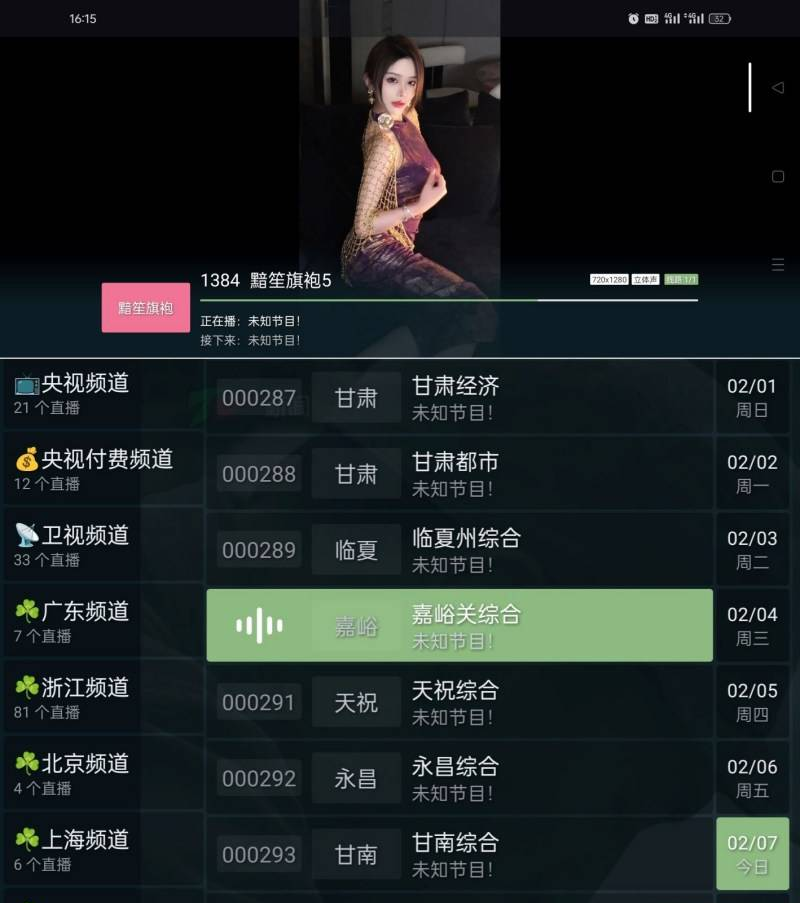
【軟體截圖】
👉 GM後台版 遊戲 推薦 ⬇️⬇️⬇️ 快速玩各種二次元動漫手遊app
【直播源清單與使用方式】
以下為內建推薦直播源,複製網址後於軟體內「網路訂閱」處貼上即可使用:
📺 雲影空濛:
https://ghfast.top/https://raw.g ... ts/main/webview.m3u
📺 webview:
https://raw.gitdubusercontent.co ... ds/main/webview.m3u
📺 笙總直播源:
https://gitee.com/huluxiaansheng/zby1.0.1/raw/master/akxl.txt
📺 電視家重生:
https://gh.catmak.name/https://r ... es/refs/heads/main/電視家.m3u
📺 好朋友直播(幾萬電影頻道):
https://gh.catmak.name/https://r ... es/refs/heads/main/幾萬電影頻道.m3u
📺 全球直播:
https://gh.catmak.name/https://r ... es/refs/heads/main/全球直播.m3u
📺 Guovin:
https://raw.gitdubusercontent.co ... put/ipv4/result.m3u
📺 推薦:
https://gitee.com/iptxhd/criptv/raw/master/xi.m3u
【附件下載】:
藍奏地址打不開教學:lanzoul 改成lanzoux 就是把l替換成m或者w 即可正常訪問《123雲盤》免中國電話免註冊下載 APP安裝、免會員VIP高速下載BUG利用、檔案管理完整教學
極致TV v0.3.1 APK 下載
推薦->藍奏雲快速直連整理下載網址
藍奏地址打不開教學:lanzoul 改成lanzoux 就是把l替換成m或者w 即可正常訪問《123雲盤》免中國電話免註冊下載 APP安裝、免會員VIP高速下載BUG利用、檔案管理完整教學



 組圖開啟中,請稍候......
 收藏
收藏
