正文摘要:
replyreload += ',' + 2442681;《Windows Defender 開關》核心主題 快速閱讀精華
🚀 一鍵搞定 Defender:
免層層翻找設定,點一下就能開關 Windows Defender! 內建定時排程功能,自動在指定時段切換防護狀態。 即時監控顯示病毒庫更新時間,系統安全狀態一目瞭然。 綠色免安裝,執行檔即開即用,不留系統垃圾。
.article-toc { border: 1px solid #ddd; padding: 15px; background: #f9f9f9; border-radius: 6px; margin: 20px 0; width: 90%;}.article-toc br { display: none;}.toc-title { /* --- 以下是合併進來的 H2 樣式 --- */ font-size: 1.25em; /* 125% */ border-left: 5px solid #2A98DA; border-radius: 2px; padding: 5px 0px 5px 10px; font-weight: bold; margin: 0 0 15px 0; /* 調整了 margin,只留下方 15px */ color: #333; line-height: 1.5; background-color: #f8f8f8; /* --- 樣式合併結束 --- */}.toc-list { list-style: none; padding-left: 0;}.toc-list li { margin: 8px 0;}.toc-list a { color: #2A98DA; text-decoration: none;}.toc-list a:hover { text-decoration: underline;}.back-to-top { display: block; margin-top: 10px; font-size: 0.9em; color: #666;}本文章目錄
軟體規格與介紹document.currentScript.previousElementSibling.href = location.href.split('#')[0] + '#intro';
軟體截圖document.currentScript.previousElementSibling.href = location.href.split('#')[0] + '#screenshot';
附件下載 🔽document.currentScript.previousElementSibling.href = location.href.split('#')[0] + '#download';
軟體規格與詳細介紹
【語 言】:中文
【軟體名稱】:Windows Defender 開關
【版本資訊】:v2026.03.18
【軟體大小】:輕量級綠色軟體
【更新日期】:2026.03.18
【使用權限】:免費綠色版
【系統支持】:Windows 10 / Windows 11
【軟體介紹】:
這款工具專門為需要頻繁切換 Windows Defender 狀態的使用者設計。有時候我們會遇到某些軟體或遊戲被 Defender 誤判攔截,或是需要暫時關閉防護來進行系統調校,這時候就能派上用場。
【附件下載】:
所有站內附件皆會附上安全掃描報告請會員查看純淨度百分比後判斷使用(adsbygoogle = window.adsbygoogle || []).push({});相關檔案須知:取得檔案前,請先詳細閱讀文章內容避免不必要錯誤與誤會發生。也可多參考文章討論樓層內容了解附件檔案相關討論資訊。
【此文章部分內容隱藏中】 解除隱藏說明教學點擊下方 繼續閱讀文章 後請仔細觀看文章內容 並依照指示進行下一步最後完成解除隱藏後系統會回到此文章自動顯示隱藏內容~繼續閱讀
replyreload += ',' + 2442681;



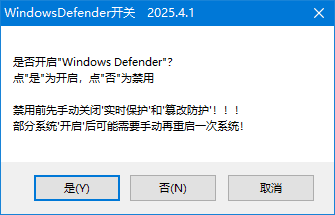
 組圖開啟中,請稍候......
 收藏
收藏
