正文摘要:
replyreload += ',' + 2465782;Axum 外部透視工具 快速閱讀精華
🔥 完全外部運作:不透過 DLL 注入,獨立程式讀取遊戲記憶體🎨 GPU/CPU 雙模式渲染:可視/隱藏雙色透視,支援線框與網格細節⚡ 即開即用:INSERT 叫出選單、END 快速離開,僅在 CS2 視窗焦點時運作
目錄導覽
.article-toc { border: 1px solid #ddd; padding: 15px; background: #f9f9f9; border-radius: 6px; margin: 20px 0; width: 90%;}.article-toc br { display: none;}.toc-title { /* --- 以下是合併進來的 H2 樣式 --- */ font-size: 1.25em; /* 125% */ border-left: 5px solid #2A98DA; border-radius: 2px; padding: 5px 0px 5px 10px; font-weight: bold; margin: 0 0 15px 0; /* 調整了 margin,只留下方 15px */ color: #333; line-height: 1.5; background-color: #f8f8f8; /* --- 樣式合併結束 --- */}.toc-list { list-style: none; padding-left: 0;}.toc-list li { margin: 8px 0;}.toc-list a { color: #2A98DA; text-decoration: none;}.toc-list a:hover { text-decoration: underline;}.back-to-top { display: block; margin-top: 10px; font-size: 0.9em; color: #666;}本文章目錄工具介紹與特色document.currentScript.previousElementSibling.href = location.href.split('#')[0] + '#intro';
系統需求與限制document.currentScript.previousElementSibling.href = location.href.split('#')[0] + '#system';
安裝與啟動教學document.currentScript.previousElementSibling.href = location.href.split('#')[0] + '#install';
功能心得分享與操作說明document.currentScript.previousElementSibling.href = location.href.split('#')[0] + '#features';
偏移值更新說明document.currentScript.previousElementSibling.href = location.href.split('#')[0] + '#offsets';
程式下載點 🔽document.currentScript.previousElementSibling.href = location.href.split('#')[0] + '#download';
常見問題Q&Adocument.currentScript.previousElementSibling.href = location.href.split('#')[0] + '#faq';
Axum 是什麼?外部透視輔助工具介紹
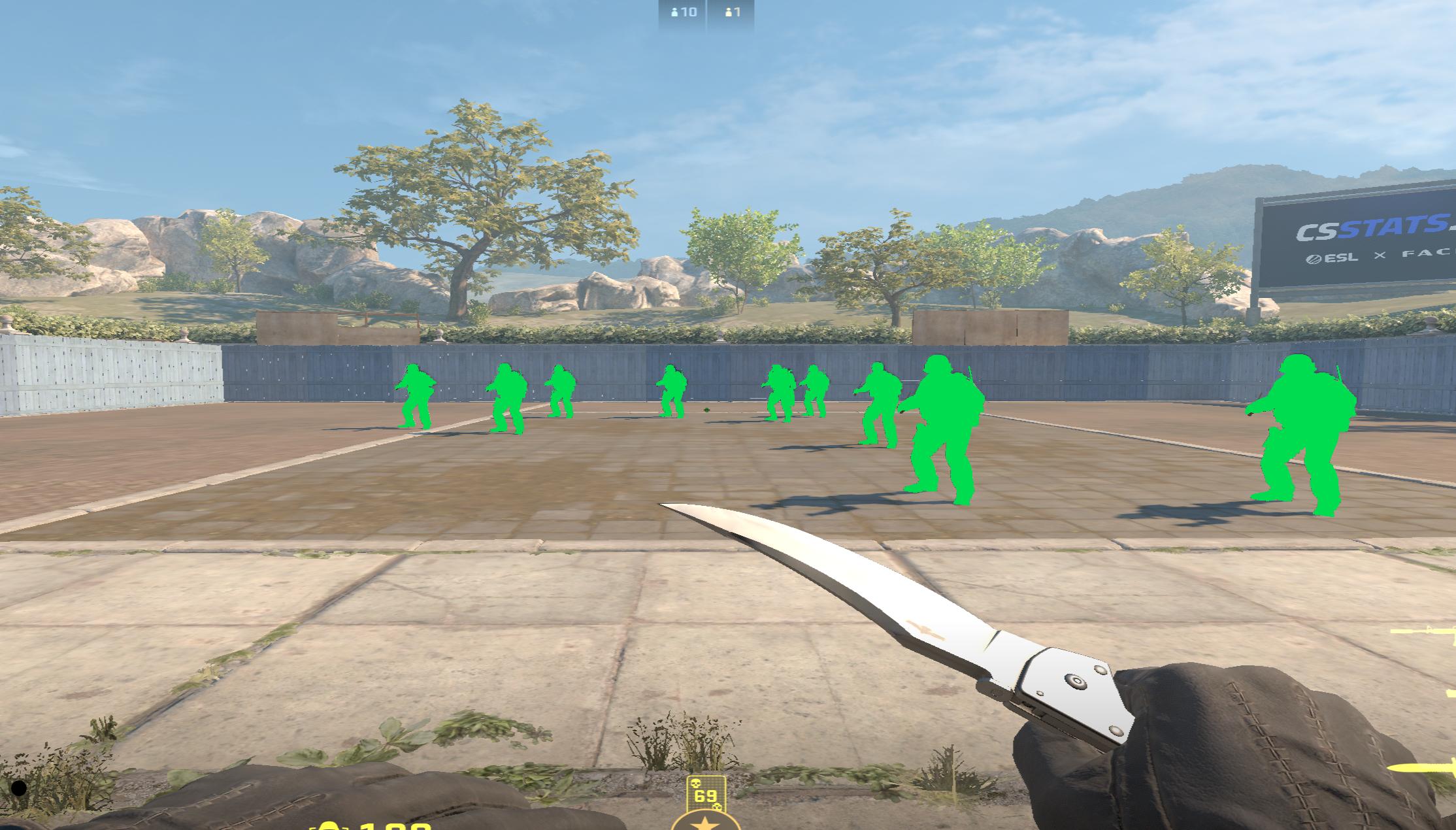
Axum 是一款針對《Counter-Strike 2》(CS2)設計的完全外部透視輔助工具,採用 Overlay 技術在獨立行程中讀取遊戲記憶體,並繪製 GLB 格式的玩家角色網格模型。與傳統 DLL 注入式外掛不同,Axum 無需修改遊戲程式本身,大幅降低被偵測的風險。
這款工具的開發初衷很簡單:市面上缺乏公開可用的外部 GLB 透視原始碼。作者釋出完整資源,讓有興趣的玩家可以自行研究、改進。
系統需求與使用限制
項目需求說明作業系統Windows 10/11 x64執行權限必須以系統管理員身分執行顯示模式僅支援視窗全螢幕或視窗模式執行檔axum.exe(Release x64 預編譯版本)必要資料夾meshes/ 與 meshes2/(執行時必須存在)
⚠️ 重要提醒:單獨執行 axum.exe 無法運作,必須連同 meshes 資料夾一併放置。此外,效能方面需注意:GPU 模式較為流暢,CPU 網格模式可能會造成明顯的 FPS 下降。
安裝與啟動教學
下載並解壓縮:將兩個壓縮檔解壓到同一個資料夾內啟動 CS2:先開啟《Counter-Strike 2》並進入遊戲執行 Axum:對 axum.exe 點擊右鍵 →「以系統管理員身分執行」呼叫選單:按 INSERT 鍵開啟功能選單結束程式:按 END 鍵關閉 Axum
功能心得分享與操作說明
Axum 提供多項透視相關功能,讓玩家能夠自訂視覺輔助效果:
GPU / CPU 網格渲染:兩種渲染模式可選,GPU 模式效能較佳可視與隱藏雙色設定:分別設定敵人在視線內(visible)與被牆壁遮擋(hidden/occluded)時的顯示顏色線框 + 網格細節:可切換純線框或完整網格顯示除錯模型覆蓋:選擇性開啟除錯用的模型 Overlay焦點偵測:僅在 CS2 視窗為前景時啟動透視,避免幹擾其他操作
偏移值更新說明
目前內建偏移值對應遊戲版本:build 14164(2026-05-22)。
若遊戲更新後 Axum 無法正常附加(attach fails),請手動更新以下檔案:
source/axum/project/utilities/offsets/axum_offsets.hpp
此檔案包含記憶體偏移值定義,需要具備基礎程式能力才能正確更新。
程式下載點
所有站內附件皆會附上安全掃描報告請會員查看純淨度百分比後判斷使用(adsbygoogle = window.adsbygoogle || []).push({});相關檔案須知:取得檔案前,請先詳細閱讀文章內容避免不必要錯誤與誤會發生。也可多參考文章討論樓層內容了解附件檔案相關討論資訊。
【此文章部分內容隱藏中】 解除隱藏說明教學點擊下方 繼續閱讀文章 後請仔細觀看文章內容 並依照指示進行下一步最後完成解除隱藏後系統會回到此文章自動顯示隱藏內容~繼續閱讀
📦 內含檔案清單:
axum.exe(預編譯執行檔,Release x64)完整原始碼(Full source)meshes/ 與 meshes2/(執行時必要資料)README.txt(使用說明)
以下廣告滑動後還有帖子內容var custom_call_MIR = function (params) {if ( params === null || params.hasAd === false ) {var divRowSide;for (let index = 0; index < ONEADs.length; index++) {if (ONEADs[index].pub.player_mode === "mobile-inread") {divRowSide = ONEADs[index].pub.slotobj;}}var ins = document.createElement('ins');ins.className = 'clickforceads';ins.setAttribute('style', 'display:inline-block;');ins.setAttribute('data-ad-zone', '18264');divRowSide.appendChild(ins);var js = document.createElement('script');js.async = true;js.type = 'text/javascript';js.setAttribute('src', '//cdn.holmesmind.com/js/init.js');js.onload = function(){console.log('[ONEAD MIR] ClickForce Loaded');};divRowSide.appendChild(js);}};var _ONEAD = {};_ONEAD.pub = {};_ONEAD.pub.slotobj = document.getElementById("oneadMIRDFPTag");_ONEAD.pub.slots = ["div-onead-ad"];_ONEAD.pub.uid = "1000509";_ONEAD.pub.external_url = "https://onead.onevision.com.tw/";_ONEAD.pub.scopes = ["spotbuy", "speed"];_ONEAD.pub.player_mode_div = "div-onead-ad";_ONEAD.pub.player_mode = "mobile-inread";_ONEAD.pub.queryAdCallback = custom_call_MIR;var ONEAD_pubs = ONEAD_pubs || [];ONEAD_pubs.push(_ONEAD);var truvidScript = document.createElement('script'); truvidScript.async = true; truvidScript.setAttribute('data-cfasync','false'); truvidScript.type = 'text/javascript'; truvidScript.src = '//stg.truvidplayer.com/index.php?sub_user_id=597&widget_id=3309&playlist_id=2381&m=a&cb=' + (Math.random() * 10000000000000000); var currentScript = document.currentScript || document.scripts[document.scripts.length - 1]; currentScript.parentNode.insertBefore(truvidScript, currentScript.nextSibling);
常見問題Q&A
Q:為什麼執行後沒有反應?
A:請確認三點:(1) 以系統管理員身分執行 (2) meshes/ 與 meshes2/ 資料夾與 exe 同目錄 (3) CS2 處於視窗全螢幕或視窗模式。
Q:遊戲更新後無法使用怎麼辦?
A:需要手動更新 offsets 檔案。前往 source/axum/project/utilities/offsets/axum_offsets.hpp 修改對應的記憶體偏移值。
Q:CPU 模式和 GPU 模式有什麼差別?
A:GPU 模式由顯示卡處理渲染,效能較好;CPU 模式由處理器運算,可能造成 FPS 下降,但相容性較廣。
Q:這會被 VAC 偵測嗎?
A:Axum 採用外部讀取記憶體設計,理論上比傳統 DLL 注入安全,但任何第三方程式皆有風險,使用前請自行評估。
Q:可以修改透視顏色嗎?
A:可以,透過 INSERT 選單可以分別調整 visible(可視)與 hidden(被遮擋)兩種狀態的顯示顏色。replyreload += ',' + 2465782;



 組圖開啟中,請稍候......
 收藏
收藏
