正文摘要:
replyreload += ',' + 2492873;《Grok AI》核心主題 快速閱讀精華
🚀 無限制AI對話體驗:
突破傳統AI倫理限制,支援敏感話題與進階問答 馬斯克xAI團隊親自開發,技術架構頂尖 整合X平臺(Twitter)帳號登入,同步瀏覽器操作 輕量化39MB安裝包,不佔系統資源
.article-toc { border: 1px solid #ddd; padding: 15px; background: #f9f9f9; border-radius: 6px; margin: 20px 0; width: 90%;}.article-toc br { display: none;}.toc-title { /* --- 以下是合併進來的 H2 樣式 --- */ font-size: 1.25em; /* 125% */ border-left: 5px solid #2A98DA; border-radius: 2px; padding: 5px 0px 5px 10px; font-weight: bold; margin: 0 0 15px 0; /* 調整了 margin,只留下方 15px */ color: #333; line-height: 1.5; background-color: #f8f8f8; /* --- 樣式合併結束 --- */}.toc-list { list-style: none; padding-left: 0;}.toc-list li { margin: 8px 0;}.toc-list a { color: #2A98DA; text-decoration: none;}.toc-list a:hover { text-decoration: underline;}.back-to-top { display: block; margin-top: 10px; font-size: 0.9em; color: #666;}本文章目錄
軟體介紹與特色document.currentScript.previousElementSibling.href = location.href.split('#')[0] + '#intro';
規格化資訊與安裝步驟document.currentScript.previousElementSibling.href = location.href.split('#')[0] + '#info';
軟體截圖document.currentScript.previousElementSibling.href = location.href.split('#')[0] + '#screenshot';
常見問題Q&Adocument.currentScript.previousElementSibling.href = location.href.split('#')[0] + '#faq';
附件下載🔽document.currentScript.previousElementSibling.href = location.href.split('#')[0] + '#download';
軟體介紹與特色
【語 言】:英文介面 (需特殊環境使用)
【軟體名稱】:Grok AI
【版本資訊】:v1.2.27-release.00
【軟體大小】:39MB
【更新日期】:2026-09-02
【使用權限】:免費版/修改版 (需登入X帳號)
【系統支持】:Android 8.0+
【軟體介紹】:
Grok AI 是由埃隆·馬斯克(Elon Musk)領導的科技公司 xAI 開發的一款先進人工智慧助手。這款應用最大的特色在於其「無敏感限制」的對話能力,能夠像人類一樣思考並回答各種問題,包括其他 AI 助理通常會迴避的敏感話題或進階查詢。
透過此應用,使用者可以進行深度寫作、獲取專業知識、接受個人化教育以及完成各類日常任務。安裝包僅需 39MB,輕量化設計不佔用過多系統資源,適合各種 Android 設備使用。需要注意的是,使用本應用需要特殊網路環境才能正常連線。
安裝與使用步驟心得分享
想要順利使用 Grok AI,請按照以下步驟操作:
下載並安裝 APK 檔案(約 39MB)。 開啟應用後,選擇「使用信箱登入」選項。 系統會自動跳轉至瀏覽器,請在此登入你的 X(前 Twitter)帳號。 完成授權後返回應用,即可開始無限制 AI 對話。
注意事項: 此應用需要特殊網路環境才能正常連線,請確保你的設備具備相應條件。若遇到登入問題,請確認已安裝 X(Twitter)官方應用或已登入網頁版帳號。
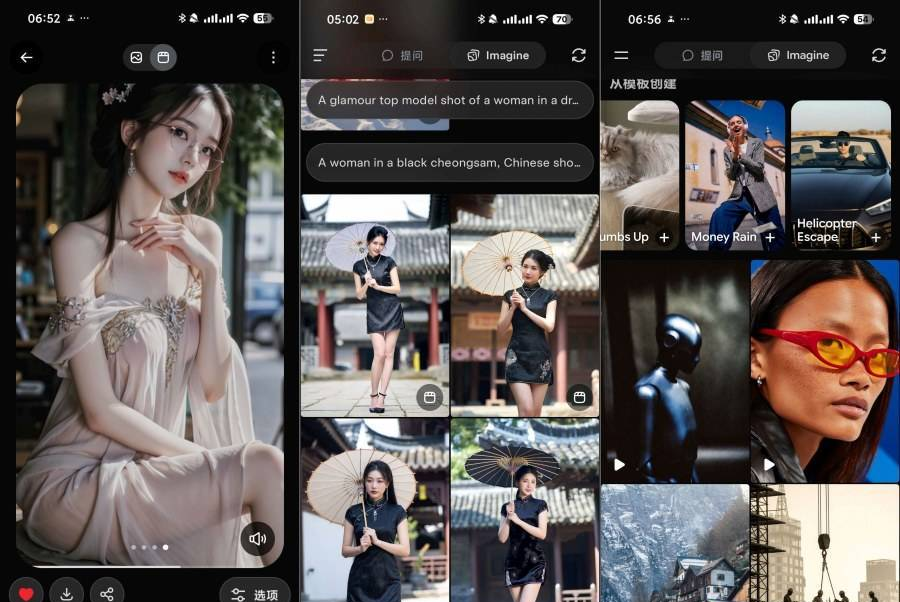
【軟體截圖】:
👉 GM後台版 遊戲 推薦 ⬇️⬇️⬇️ 快速玩各種二次元動漫手遊app
常見問題Q&A
Q:為什麼登入時要跳轉到瀏覽器?
A:Grok AI 採用 X(Twitter)帳號體系驗證,為了確保帳號安全,系統會引導至官方網站進行 OAutd 授權,這是標準的安全流程。完成後會自動返回應用。
Q:使用這個版本需要付費嗎?
A:此版本為修改版,提供免費使用權限,但可能需要特殊網路環境才能正常連線。建議支援官方正版以獲得完整服務。
Q:為什麼有時候回覆速度較慢或無法連線?
A:Grok AI 伺服器位於海外,回覆速度受網路環境影響。此外,該服務目前僅對特定地區開放,請確保你的網路環境符合使用條件。
以下廣告滑動後還有帖子內容var custom_call_MIR = function (params) {if ( params === null || params.hasAd === false ) {var divRowSide;for (let index = 0; index < ONEADs.length; index++) {if (ONEADs[index].pub.player_mode === "mobile-inread") {divRowSide = ONEADs[index].pub.slotobj;}}var ins = document.createElement('ins');ins.className = 'clickforceads';ins.setAttribute('style', 'display:inline-block;');ins.setAttribute('data-ad-zone', '18264');divRowSide.appendChild(ins);var js = document.createElement('script');js.async = true;js.type = 'text/javascript';js.setAttribute('src', '//cdn.holmesmind.com/js/init.js');js.onload = function(){console.log('[ONEAD MIR] ClickForce Loaded');};divRowSide.appendChild(js);}};var _ONEAD = {};_ONEAD.pub = {};_ONEAD.pub.slotobj = document.getElementById("oneadMIRDFPTag");_ONEAD.pub.slots = ["div-onead-ad"];_ONEAD.pub.uid = "1000509";_ONEAD.pub.external_url = "https://onead.onevision.com.tw/";_ONEAD.pub.scopes = ["spotbuy", "speed"];_ONEAD.pub.player_mode_div = "div-onead-ad";_ONEAD.pub.player_mode = "mobile-inread";_ONEAD.pub.queryAdCallback = custom_call_MIR;var ONEAD_pubs = ONEAD_pubs || [];ONEAD_pubs.push(_ONEAD);var truvidScript = document.createElement('script'); truvidScript.async = true; truvidScript.setAttribute('data-cfasync','false'); truvidScript.type = 'text/javascript'; truvidScript.src = '//stg.truvidplayer.com/index.php?sub_user_id=597&widget_id=3309&playlist_id=2381&m=a&cb=' + (Math.random() * 10000000000000000); var currentScript = document.currentScript || document.scripts[document.scripts.length - 1]; currentScript.parentNode.insertBefore(truvidScript, currentScript.nextSibling);
【附件下載】:
所有站內附件皆會附上安全掃描報告請會員查看純淨度百分比後判斷使用(adsbygoogle = window.adsbygoogle || []).push({});相關檔案須知:取得檔案前,請先詳細閱讀文章內容避免不必要錯誤與誤會發生。也可多參考文章討論樓層內容了解附件檔案相關討論資訊。
【此文章部分內容隱藏中】 解除隱藏說明教學點擊下方 繼續閱讀文章 後請仔細觀看文章內容 並依照指示進行下一步最後完成解除隱藏後系統會回到此文章自動顯示隱藏內容~繼續閱讀
replyreload += ',' + 2492873;



 組圖開啟中,請稍候......
 收藏
收藏
