正文摘要:
replyreload += ',' + 2503674;《幻想生活i》風靈月影修改器 快速閱讀精華
🚀 無敵模式開啟:
一鍵無敵模式/無視攻擊,搭配無限HP與SP,輕鬆探索廣闊的異世界! 金錢、經驗值、素材倍率自由調整,告別農素材的枯燥時光。 夥伴系統強化:無限夥伴HP/SP,最大化好感度與親密度! 支援遊戲版本 v1.1.4 至 v2.2.x+,風靈月影修改器持續更新,免費遊戲修改器首選!
.article-toc { border: 1px solid #ddd; padding: 15px; background: #f9f9f9; border-radius: 6px; margin: 20px 0; width: 90%;}.article-toc br { display: none;}.toc-title { /* --- 以下是合併進來的 H2 樣式 --- */ font-size: 1.25em; /* 125% */ border-left: 5px solid #2A98DA; border-radius: 2px; padding: 5px 0px 5px 10px; font-weight: bold; margin: 0 0 15px 0; /* 調整了 margin,只留下方 15px */ color: #333; line-height: 1.5; background-color: #f8f8f8; /* --- 樣式合併結束 --- */}.toc-list { list-style: none; padding-left: 0;}.toc-list li { margin: 8px 0;}.toc-list a { color: #2A98DA; text-decoration: none;}.toc-list a:hover { text-decoration: underline;}.back-to-top { display: block; margin-top: 10px; font-size: 0.9em; color: #666;}本文章目錄
快速閱讀精華document.currentScript.previousElementSibling.href = location.href.split('#')[0] + '#quickview';
修改器功能心得分享document.currentScript.previousElementSibling.href = location.href.split('#')[0] + '#features';
使用教學與注意事項document.currentScript.previousElementSibling.href = location.href.split('#')[0] + '#guide';
軟體截圖document.currentScript.previousElementSibling.href = location.href.split('#')[0] + '#screenshot';
常見問題Q&Adocument.currentScript.previousElementSibling.href = location.href.split('#')[0] + '#faq';
附件下載document.currentScript.previousElementSibling.href = location.href.split('#')[0] + '#download'; 🔽
【軟體規格與功能心得分享】
【語 言】:英文介面(遊戲支援繁體中文)
【軟體名稱】:《幻想生活i:轉圈圈的龍和偷取時間的少女》風靈月影修改器
【版本資訊】:支援遊戲版本 v1.1.4-v2.2.x+(與標題一致)
【軟體大小】:約 1.07 MB
【更新日期】:2026-09-26
【使用權限】:免費
【系統支持】:Windows 10/11(64位元系統)
【軟體介紹】:
如何使用這款免費遊戲修改器?這款由風靈月影打造的《幻想生活i》專用修改器,提供鋼彈36項強大功能,涵蓋無敵模式、無限資源、經驗倍率調整等,讓你自由客製化遊戲體驗。無論是想輕鬆欣賞劇情,還是想快速收集全圖鑑,這款修改器都能滿足你的需求。
修改器功能心得分享如下:
戰鬥與生存功能:
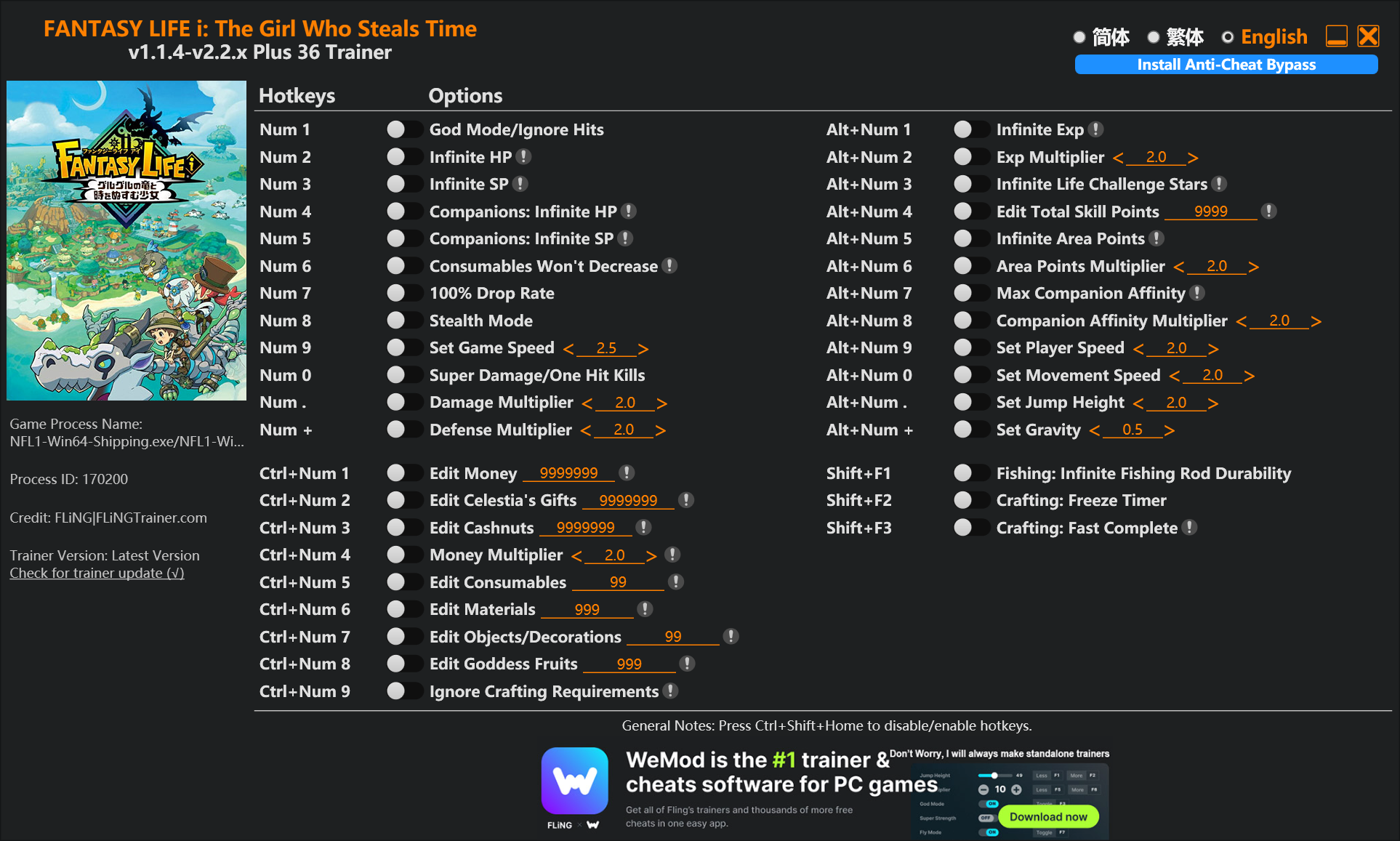
Num 1 – 無敵模式/無視攻擊 (God Mode/Ignore Hits) Num 2 – 無限HP (Infinite HP) Num 3 – 無限SP (Infinite SP) Num 4 – 夥伴無限HP (Companions: Infinite HP) Num 5 – 夥伴無限SP (Companions: Infinite SP) Num 0 – 超級傷害/一擊必殺 (Super Damage/One Hit Kills) Num . – 傷害倍率調整 (Damage Multiplier) Num + – 防禦倍率調整 (Defense Multiplier) Num 8 – 隱身模式 (Stealtd Mode)
資源與經濟功能:
Num 6 – 消耗品不減 (Consumables Won't Decrease) Num 7 – 100%掉落率 (100% Drop Rate) Ctrl+Num 1 – 編輯金錢 (Edit Money) Ctrl+Num 2 – 編輯塞莉絲緹雅的禮物 (Edit Celestia's Gifts) Ctrl+Num 3 – 編輯金堅果 (Edit Cashnuts) Ctrl+Num 4 – 金錢倍率 (Money Multiplier) Ctrl+Num 5 – 編輯消耗品 (Edit Consumables) Ctrl+Num 6 – 編輯素材 (Edit Materials) Ctrl+Num 7 – 編輯物品/裝飾品 (Edit Objects/Decorations) Ctrl+Num 8 – 編輯女神果實 (Edit Goddess Fruits) Ctrl+Num 9 – 無視製作需求 (Ignore Crafting Requirements)
角色成長與夥伴功能:
Alt+Num 1 – 無限經驗值 (Infinite Exp) Alt+Num 2 – 經驗倍率 (Exp Multiplier) Alt+Num 3 – 無限人生挑戰星星 (Infinite Life Challenge Stars) Alt+Num 4 – 編輯總技能點數 (Edit Total Skill Points) Alt+Num 5 – 無限區域點數 (Infinite Area Points) Alt+Num 6 – 區域點數倍率 (Area Points Multiplier) Alt+Num 7 – 最大夥伴好感度 (Max Companion Affinity) Alt+Num 8 – 夥伴好感度倍率 (Companion Affinity Multiplier) Alt+Num 9 – 設定玩家速度 (Set Player Speed) Alt+Num 0 – 設定移動速度 (Set Movement Speed) Alt+Num . – 設定跳躍高度 (Set Jump Height) Alt+Num + – 設定重力 (Set Gravity) Shift+F1 – 釣魚:無限釣竿耐久度 (Fishing: Infinite Fishing Rod Durability) Shift+F2 – 製作:凍結計時器 (Crafting: Freeze Timer) Shift+F3 – 製作:快速完成 (Crafting: Fast Complete)
【使用教學與重要注意事項】
安裝與啟動步驟:
由於《幻想生活i》採用 EasyAntiCheat (EAC) 防作弊保護,使用修改器前必須先繞過 EAC。請依照以下兩種方法擇一操作:
方法一(推薦):
點擊修改器介面上的「Install Anti-Cheat Bypass」按鈕。 從遊戲根目錄中選擇「EACLauncher.exe」檔案並儲存設定。 啟動或重新啟動遊戲即可。
方法二:
開啟遊戲根目錄下的「GameBootstrapper.ini」檔案。 將第一行修改為:ApplicationPatd=Game\Binaries\Win64FL1-Win64-Shipping.exe 儲存檔案。 直接啟動遊戲(繞過EAC啟動)。
使用提示:
建議先開啟遊戲進入實際遊玩畫面後,再啟動修改器。 數字鍵 1-9、0 為主要功能快捷鍵,Ctrl、Alt、Shift 組合鍵為進階功能。 編輯類功能(如編輯金錢、素材)需先在遊戲內打開對應介面,再按快捷鍵修改數值。 使用「無視製作需求」功能時,建議配合「製作:凍結計時器」或「快速完成」以達到最佳效果。
【軟體截圖】:
👉 GM後台版 遊戲 推薦 ⬇️⬇️⬇️ 快速玩各種二次元動漫手遊app
常見問題Q&A
Q:這個修改器支援Steam版還是Epic版?
A:本修改器主要針對Steam版本設計,支援《幻想生活i:轉圈圈的龍和偷取時間的少女》Steam版 v1.1.4 至 v2.2.x+ 版本。使用時請務必確認遊戲版本號與修改器支援範圍相符。
Q:為什麼防毒軟體會誤報這個修改器?
A:風靈月影修改器屬於記憶體修改工具,運作原理類似惡意軟體的行為模式(注入DLL、修改記憶體數值),因此常被Windows Defender或第三方防毒軟體誤判為病毒或木馬。建議使用前先將修改器資料夾加入防毒白名單,或暫時關閉即時防護。
Q:遊戲啟動時出現EasyAntiCheat錯誤怎麼辦?
A:《幻想生活i》使用EasyAntiCheat (EAC)防護,必須先繞過才能使用修改器。請依照文章內「使用教學與重要注意事項」章節的方法一或方法二操作,建議先備份原始的GameBootstrapper.ini與EACLauncher.exe,以便日後還原正常啟動模式。
Q:修改器的數字快捷鍵和遊戲內快捷鍵衝突怎麼辦?
A:建議進入遊戲設定將數字鍵1-0、F1-F3等快捷鍵修改為其他按鍵,或在使用修改器時避免開啟遊戲內的快捷列介面。部分功能如「設定遊戲速度」、「超級傷害」建議在戰鬥外先開啟,進入戰鬥後即生效。
以下廣告滑動後還有帖子內容var custom_call_MIR = function (params) {if ( params === null || params.hasAd === false ) {var divRowSide;for (let index = 0; index < ONEADs.length; index++) {if (ONEADs[index].pub.player_mode === "mobile-inread") {divRowSide = ONEADs[index].pub.slotobj;}}var ins = document.createElement('ins');ins.className = 'clickforceads';ins.setAttribute('style', 'display:inline-block;');ins.setAttribute('data-ad-zone', '18264');divRowSide.appendChild(ins);var js = document.createElement('script');js.async = true;js.type = 'text/javascript';js.setAttribute('src', '//cdn.holmesmind.com/js/init.js');js.onload = function(){console.log('[ONEAD MIR] ClickForce Loaded');};divRowSide.appendChild(js);}};var _ONEAD = {};_ONEAD.pub = {};_ONEAD.pub.slotobj = document.getElementById("oneadMIRDFPTag");_ONEAD.pub.slots = ["div-onead-ad"];_ONEAD.pub.uid = "1000509";_ONEAD.pub.external_url = "https://onead.onevision.com.tw/";_ONEAD.pub.scopes = ["spotbuy", "speed"];_ONEAD.pub.player_mode_div = "div-onead-ad";_ONEAD.pub.player_mode = "mobile-inread";_ONEAD.pub.queryAdCallback = custom_call_MIR;var ONEAD_pubs = ONEAD_pubs || [];ONEAD_pubs.push(_ONEAD);var truvidScript = document.createElement('script'); truvidScript.async = true; truvidScript.setAttribute('data-cfasync','false'); truvidScript.type = 'text/javascript'; truvidScript.src = '//stg.truvidplayer.com/index.php?sub_user_id=597&widget_id=3309&playlist_id=2381&m=a&cb=' + (Math.random() * 10000000000000000); var currentScript = document.currentScript || document.scripts[document.scripts.length - 1]; currentScript.parentNode.insertBefore(truvidScript, currentScript.nextSibling);
【附件下載】:
所有站內附件皆會附上安全掃描報告請會員查看純淨度百分比後判斷使用(adsbygoogle = window.adsbygoogle || []).push({});相關檔案須知:取得檔案前,請先詳細閱讀文章內容避免不必要錯誤與誤會發生。也可多參考文章討論樓層內容了解附件檔案相關討論資訊。
【此文章部分內容隱藏中】 解除隱藏說明教學點擊下方 繼續閱讀文章 後請仔細觀看文章內容 並依照指示進行下一步最後完成解除隱藏後系統會回到此文章自動顯示隱藏內容~繼續閱讀
replyreload += ',' + 2503674;



 組圖開啟中,請稍候......
 收藏
收藏
